

LeafyApp

對螢幕上任何一個詞按 ⌥A。它讀的是整句話,不是單個詞。

下載

macOS 14+,完全免費

和其他讀者一起

當你正在閱讀

She had read the word a hundred times before, but only now, by the river at dawn, did it truly land:
the water was effervescent , and for a moment the whole current seemed to lift and breathe, each ripple catching the first pale light and breaking it into a thousand small bubbles of gold that rose, trembled, and were gone before she could name them. She read the sentence again, slower this time, mouthing the word to feel its shape, and something about the morning, the cold air, the moving water, the hush over everything, made it stay with her for good.

三個鍵,字就是你的了。

⌥A 在任何地方、任何 app 裡。游標會變成一個框。

框住那個字 在螢幕上拖一下就行。文字還是圖片,沒差別。

讀它 釋義出現在字的下面,就在你遇到它的那句話裡。

別的地方選不了的頁面。

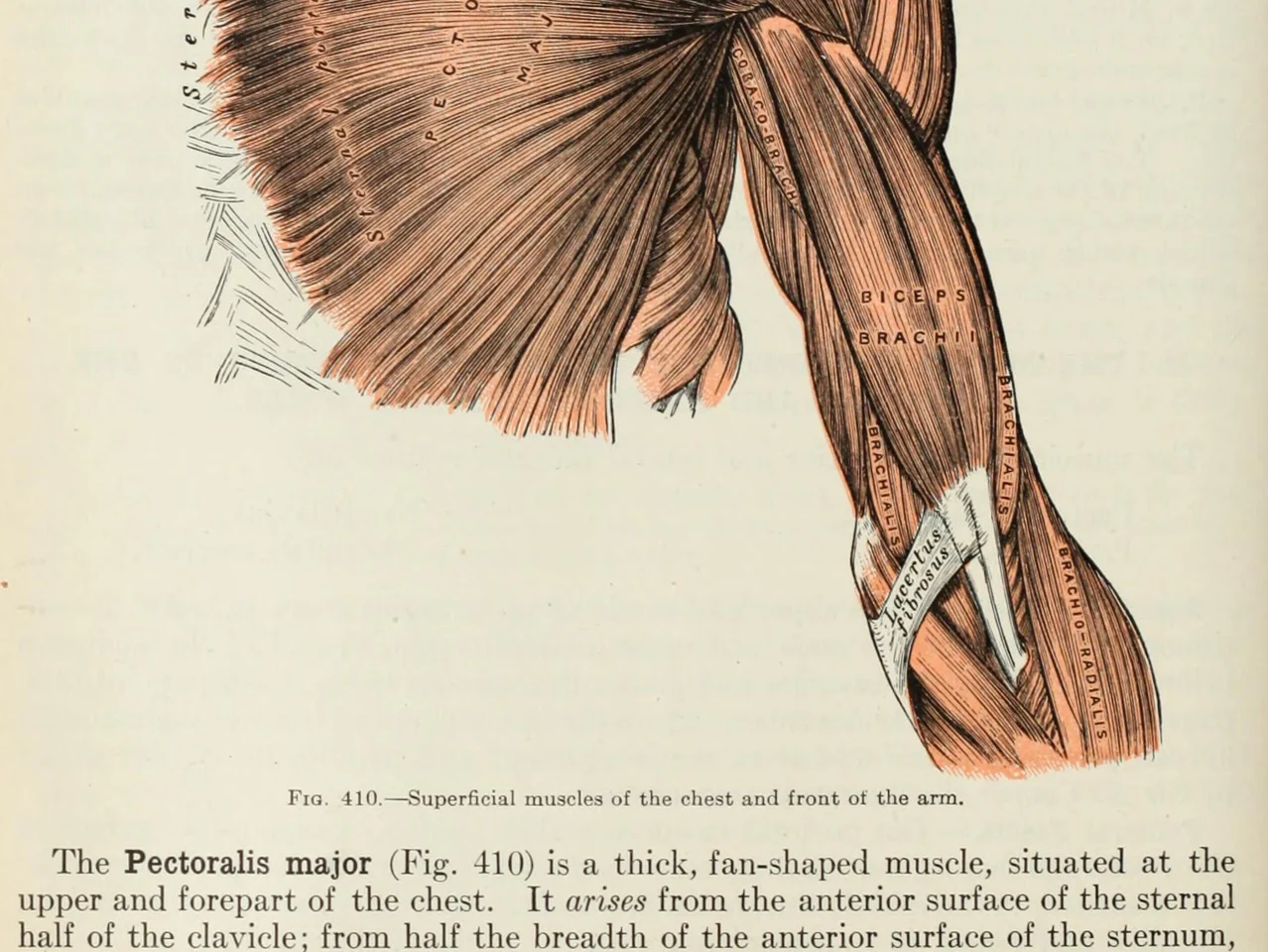
An anatomy plate of the muscles of the arm, each one labelled inside the drawing

圖片裡的文字。 圖表、標記的圖形、字幕、朋友傳來的截圖。你眼睛能讀,LeafyApp 就能讀。

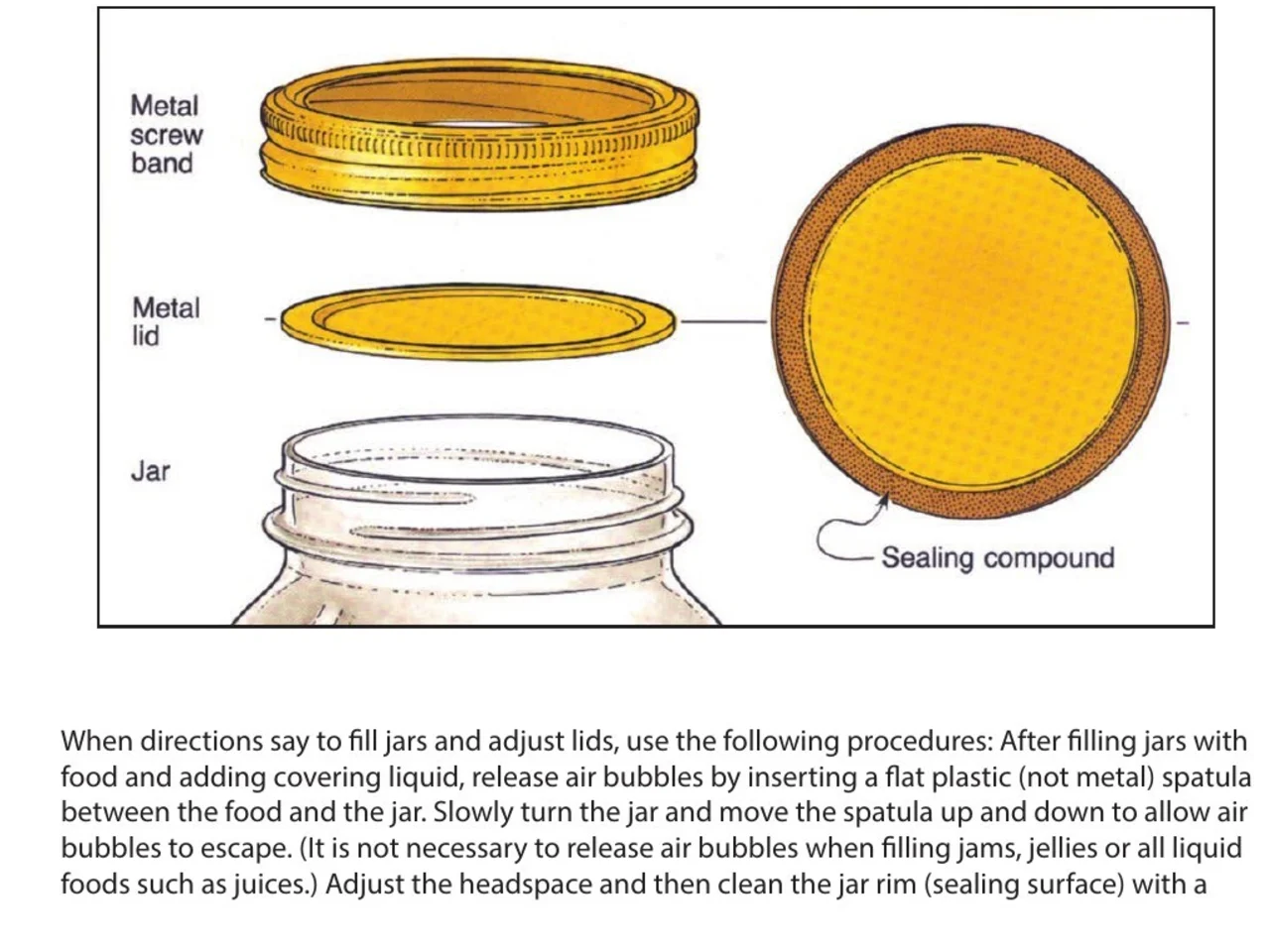
A step-by-step diagram of a canning jar, its screw band, lid and sealing compound each named beside it

說明書和手冊。 圖的旁邊標著這部分叫什麼,在沒人做成可選取文字的 PDF 裡。框住那個名字,把它屬於的步驟記下來。

An engineering drawing of the Space Shuttle payload bay, its parts keyed A to F to a legend beside the drawing

圖紙和平面圖。 每個部分都用引線標著名字,這些全是圖片。框住標籤,查出它是什麼意思。

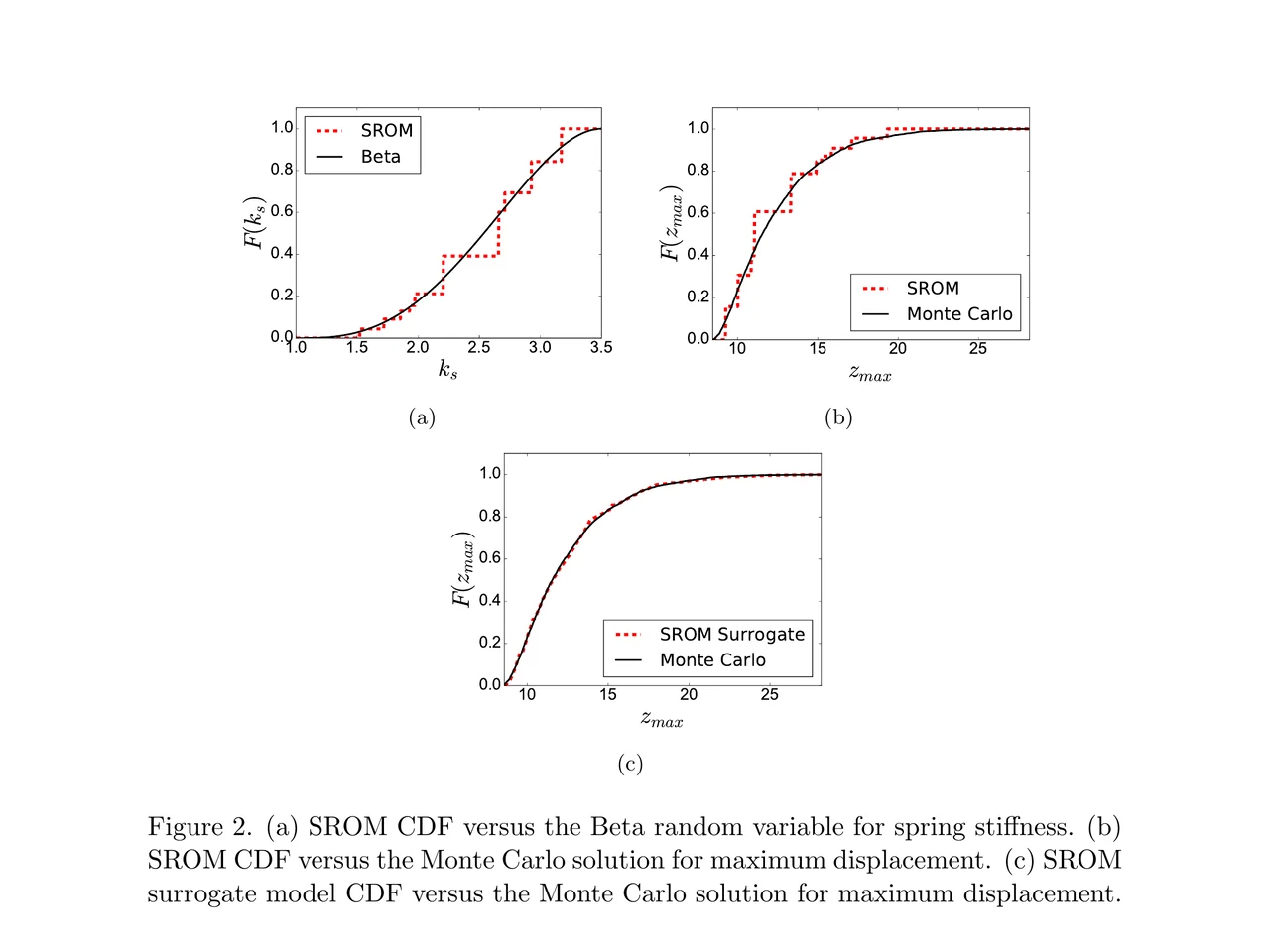
A page of a NASA technical memorandum: three plots and the figure caption under them

論文和它的圖表。 坐標標籤、圖例條目、標題裡的術語。框住任何一個,不用離開這頁。

拖進資料夾。
寫下你自己的筆記。

資料夾 把字拖進一門語言、一門課、一本書。每個資料夾各自計數。

出處 每個字都帶著那句話、來源和你遇到它的日期。

按句子給釋義 不是字典裡掛在這個字下面的那條,而是它在你遇到的那一行裡的意思。

在你遇到它的那句話裡 字回到你儲存它的那句話裡,挖掉一個空。不是一張光禿禿的卡。

替你排好時間 FSRS-5,Anki 換用的那套演算法。間隔從一小時到十年。

不用先建牌組 你查過的每個字都已經在裡面了。沒有要先建的牌組。

大家怎麼說

“I have probably cried closer to a quarter as many times in a week.”

pandaprincess醫學院三年級 · Product Hunt

INSANELY responsive developer!! Will expand on this in the points below, since the features I LOVE tie into how responsive the developer is.

I'm currently a medical student who has started clinical rotations, so it is not only learning a lot of names of conditions, drugs and therapeutics on the fly. All of the drugs have both a brand name and a generic name, and on top of that every professional who uses the electronic medical record to write their notes uses abbreviations for the conditions, drugs and procedures.

Through mostly a variety of brainstorming / whining sessions (on my part):

I mentioned that having Leafy reference MY personal list of words and phrases first when scanning would be incredible, since medical abbreviations can mean other things in other contexts (example: SOB should be “shortness of breath”, not “son of a…” anyway). I think within 5 days the next update included that feature.

I mentioned the new feature was working perfectly, but that it might take me a while to build my vocab list in Leafy, and that there was no easy way to import everything I already had in my Anki deck (Anki is the flashcard app most med students rely on). Now the current version has an Anki integration, so with the settings adjusted, scanned words reference YOUR vocab list and/or YOUR Anki deck first, and if you don't have a card for it YOU CAN ADD IT DIRECTLY TO ANKI FROM WITHIN LEAFY.

The fact that this all happens inside the Leafy popup has made reading other providers' notes on the EMR SO much less stressful. Being able to translate a summary statement like “78M hx HTN, HLD, CAD s/p CABG and multiple PCIs, CKD3 transferred from OSH after 2 episodes of right sided vision loss and imaging demonstrating severe stenosis of L ICA” without leaving the screen is SUCH A GAME CHANGER.

I actually cannot rave enough about this app. The 3rd year of medical school is known to induce a good amount of crying from students, just from the sheer volume of information you need to process while studying and while helping care for patients. I have probably cried closer to a quarter as many times in a week, just from the time and frustration saved having an easier time referencing the terms I need, and it is making it 1000x faster for me to actually learn them.

Automatically saved with its surrounding context.

This is super cool! It is so nice that it quizzes you directly on the text you were reading instead of forcing you to build custom study lists.

Being able to scan a word anywhere on my screen and have it automatically saved with its surrounding context makes reviewing my study materials so much faster. I can already tell this will make tackling heavy reading assignments a lot less tedious.

AlawayProduct Hunt

The cleanest macOS app I have ever used.

Leafy saves the words and the contexts while I look up words reading papers, so I can review them later.

The context save is so smart. That is the key to making the word list alive. The AI responses are really fast and give the meaning in context, so I understand immediately. It is best for building a personal word list and reviewing later.

linryicProduct Hunt

It solves this gap brilliantly.

I was in search of a solution out of sheer desperation after constantly running into the limits of macOS’s built-in dictionary, which falls short across many third-party and proprietary applications. That is how I found Leafy.

Leafy’s interface is surprisingly intuitive and straightforward. It runs smoothly even on my older Apple M2 chip and clearly receives ongoing care, supported by a developer that resolves issues quickly.

The application integrates seamlessly with my workflow across a variety of apps, including Anki, Obsidian, Apple Books, Arc, and Discord. I especially appreciate that saved words retain their original context, which significantly boosts retention.

As a feature request for future updates, it would be incredible to have the ability to import custom dictionary files so we can rely on local data sources.

MaxDiscord

多少錢

每次查詞都要跑一次 AI,總得有人付這筆錢。

免費

$0/月

少量掃描,AI 的錢我們出。

  • 每天查 12 個詞
  • 7 天的歷史和統計
  • 匯出為 CSV

下載 LeafyApp

按月

$6.99/月

想掃多少掃多少,AI 的錢我們出。

  • 無限查詞和翻譯
  • 全部歷史和統計
  • 匯出 Anki、Excel、JSON 和 PDF

看看月付

年付

$5/月

每年 $59.99。 省 29% 相比月付。

  • 無限查詞和翻譯
  • 全部歷史和統計
  • 匯出 Anki、Excel、JSON 和 PDF
  • 省兩個月相比月付

看看年付

想要折扣?

每月 $3.49,或每年 $29.99,永久有效。

加入 Discord

常見問題

在哪裡能用?
支援哪些語言?
  • 阿拉伯語
  • 英語
  • 法語
  • 德語
  • 希臘語
  • 義大利語
  • 日語
  • 簡體中文
  • 西班牙語
  • 泰語
  • 越南文
匯入匯出?
  • Anki
  • CSV
  • Excel
  • JSON
  • PDF
  • 範本匯入
釋義是哪來的?

AI 會連著你儲存時的那句話一起讀這個字,所以給的是它在那句話裡的意思,不是字典上的每一個義項。LeafyApp 用的是 DeepSeek。AI 有時候會出錯,所以原句一直擺在釋義旁邊。

到底有什麼會離開我的 Mac?

只有那個字和它所在的那句話。別的什麼都沒有。截圖只用來把字提取出來,然後就丟掉:不寫進硬碟,也不上傳。沒有帳號,所以傳出去的東西不掛在任何人名下。

掃描版 PDF 能用嗎?

能。你框哪裡 LeafyApp 就對哪裡做文字辨識(OCR),所以掃描件、截圖、字幕、書頁照片,跟能選取的文字一樣好用。辨識在你自己的 Mac 上跑,不上伺服器。

LeafyApp 會一直看著我的螢幕嗎?

不會。只在你按快捷鍵的那一下才看,而且只看你框出來的那塊。背景什麼都不跑,截圖不儲存也不上傳。

隱私呢?
  • 只在你按快捷鍵時才看螢幕
  • 截圖不儲存、不上傳
  • 只有單字和它所在那句話會傳出去
  • 單字庫只留在這台 Mac 上
  • 無帳號,無廣告
  • 使用統計可以關掉
  • 閱讀隱私政策