

LeafyApp

⌥A sur n'importe quel mot à l'écran.
LeafyApp lit la phrase, pas seulement le mot.

Télécharger

macOS 14+, entièrement gratuit

Rejoignez d'autres lecteurs

Pendant votre lecture

She had read the word a hundred times before, but only now, by the river at dawn, did it truly land:
the water was effervescent , and for a moment the whole current seemed to lift and breathe, each ripple catching the first pale light and breaking it into a thousand small bubbles of gold that rose, trembled, and were gone before she could name them. She read the sentence again, slower this time, mouthing the word to feel its shape, and something about the morning, the cold air, the moving water, the hush over everything, made it stay with her for good.

Trois touches, et il est à toi.

Appuie sur ⌥A N’importe où, dans n’importe quelle app. Le curseur devient un cadre.

Encadre le mot Glisse sur n’importe quoi à l’écran. Texte ou image, aucune différence.

Lis Le sens apparaît sous le mot, dans la phrase où tu l’as rencontré.

Les pages que personne d'autre ne peut sélectionner.

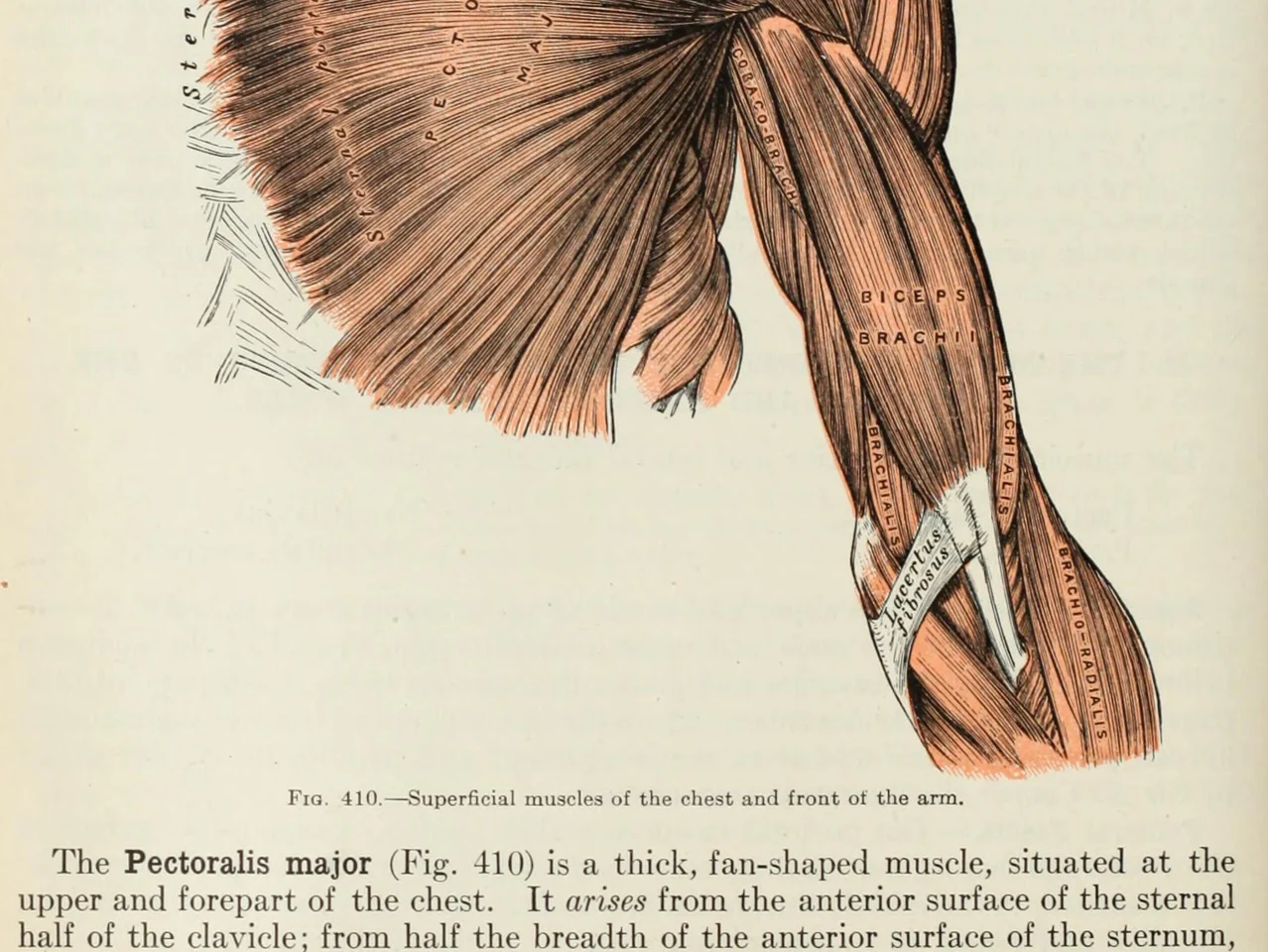
An anatomy plate of the muscles of the arm, each one labelled inside the drawing

Les mots dans les images. Diagrammes, dessins annotés, sous-titres, une capture d'écran qu'un ami vous a envoyée. Si vos yeux peuvent la lire, LeafyApp aussi.

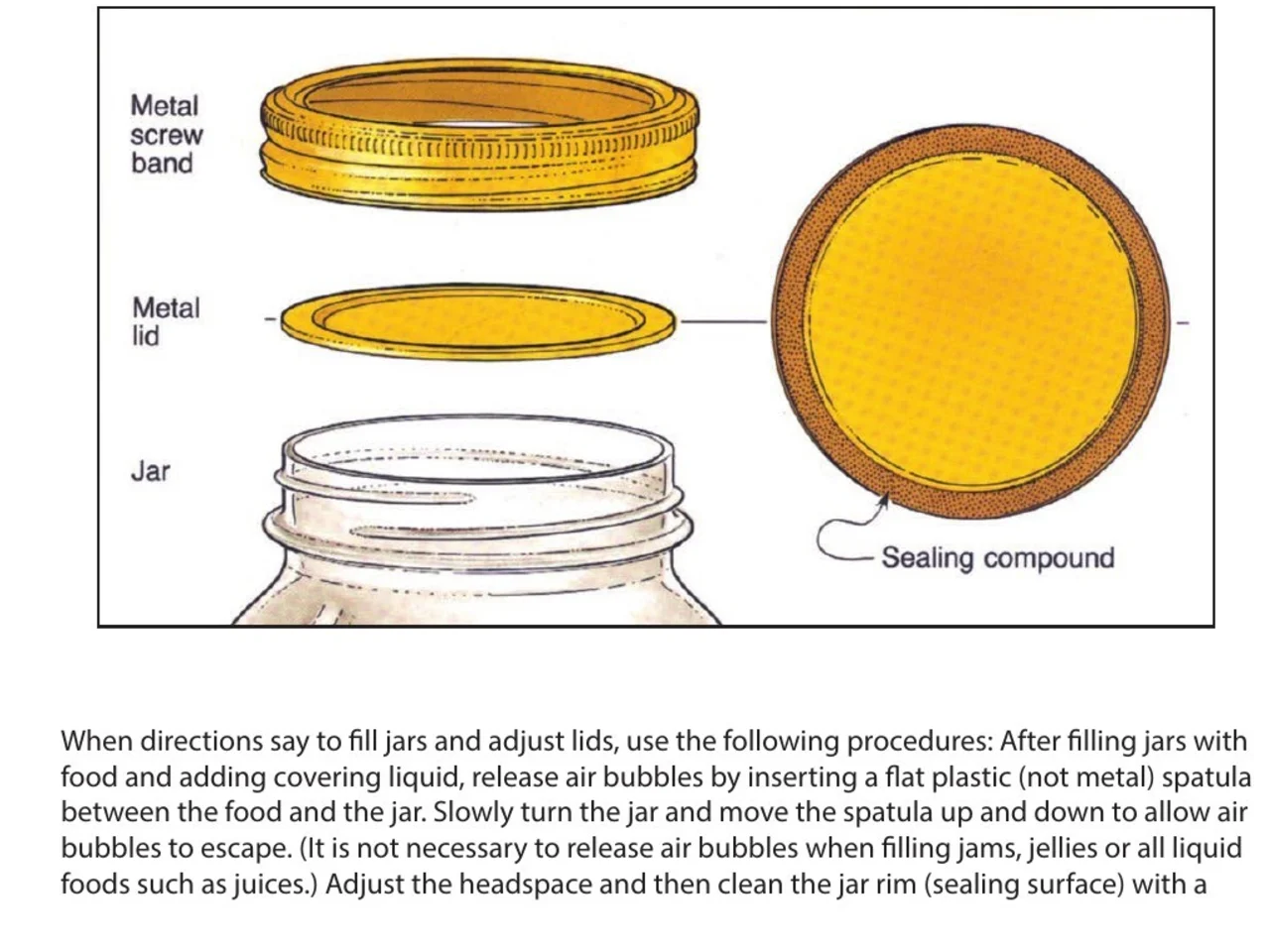
A step-by-step diagram of a canning jar, its screw band, lid and sealing compound each named beside it

Instructions et manuels. La partie que vous avez besoin de nommer à côté du dessin qui la représente, dans un PDF que personne n'a rendu sélectionnable. Encadrez le nom, gardez l'étape à laquelle il appartient.

An engineering drawing of the Space Shuttle payload bay, its parts keyed A to F to a legend beside the drawing

Dessins et plans. Chaque partie nommée sur une ligne de repère, rien de tout cela n'est du texte. Encadrez l'étiquette et lisez ce qu'elle signifie.

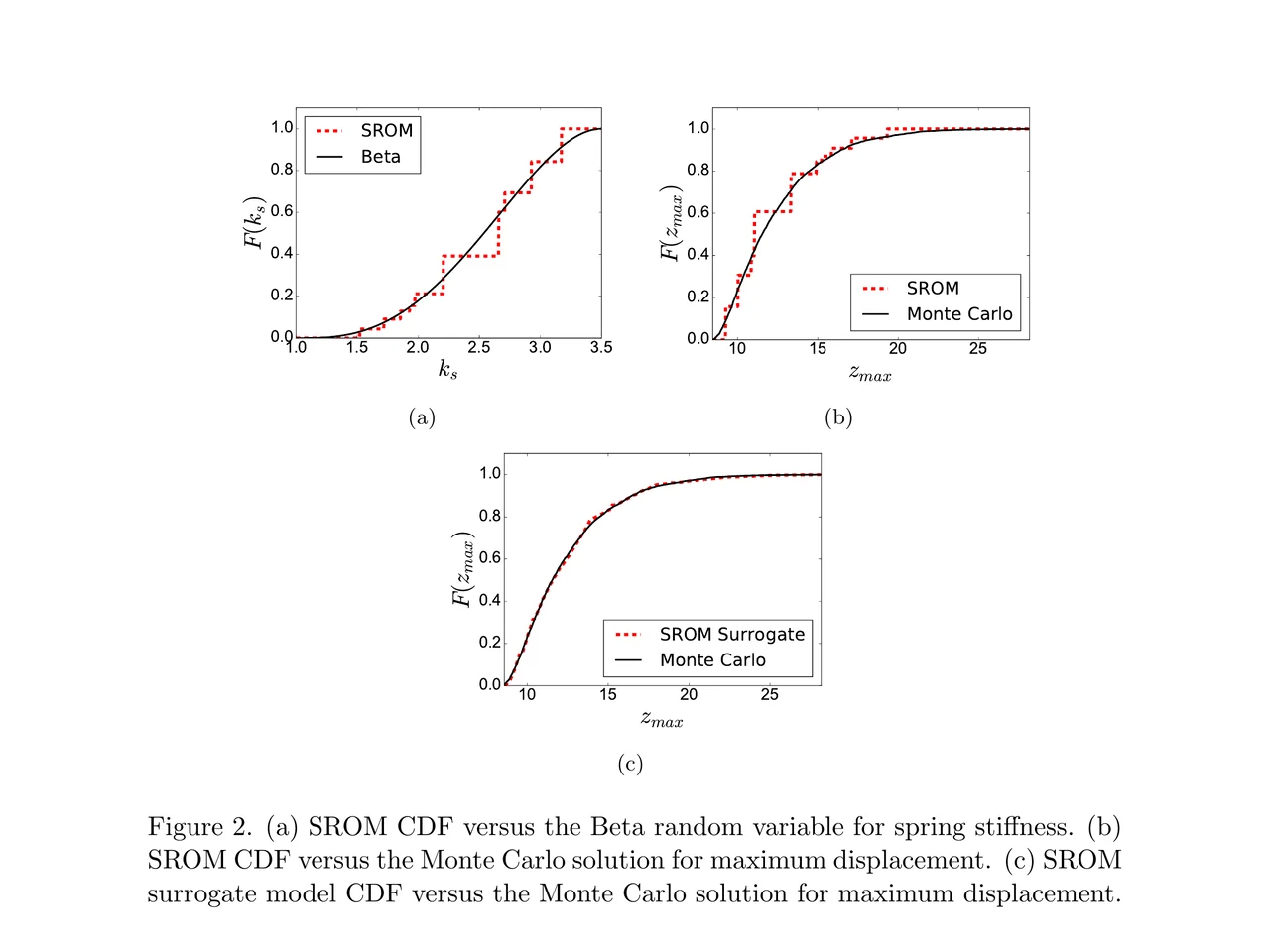
A page of a NASA technical memorandum: three plots and the figure caption under them

Articles et leurs figures. Une étiquette d'axe, une entrée de légende, un terme dans la légende. Encadrez n'importe lequel là où il se trouve, sans quitter la page.

Glisse-le dans un dossier.
Écris ta propre note.

Dossiers Glisse les mots dans une langue, un cours, un livre. Chaque dossier garde son propre compte.

D’où ça vient Chaque mot garde la phrase, la source et le jour où tu l’as trouvé.

Défini par la phrase Pas l’entrée de dictionnaire classée sous le mot. Le sens qu’il porte dans la ligne où tu l’as trouvé.

Dans la phrase où tu l’as rencontré Le mot revient dans la ligne d’où tu l’as enregistré, avec un trou. Pas une carte nue.

Planifié pour toi FSRS-5, l’algorithme adopté par Anki. Des intervalles d’une heure à dix ans.

Rien à configurer Chaque mot que tu as cherché y est déjà. Aucun paquet à construire d’abord.

Ce que les gens disent

“I have probably cried closer to a quarter as many times in a week.”

pandaprincessTroisième année de médecine · Product Hunt

INSANELY responsive developer!! Will expand on this in the points below, since the features I LOVE tie into how responsive the developer is.

I'm currently a medical student who has started clinical rotations, so it is not only learning a lot of names of conditions, drugs and therapeutics on the fly. All of the drugs have both a brand name and a generic name, and on top of that every professional who uses the electronic medical record to write their notes uses abbreviations for the conditions, drugs and procedures.

Through mostly a variety of brainstorming / whining sessions (on my part):

I mentioned that having Leafy reference MY personal list of words and phrases first when scanning would be incredible, since medical abbreviations can mean other things in other contexts (example: SOB should be “shortness of breath”, not “son of a…” anyway). I think within 5 days the next update included that feature.

I mentioned the new feature was working perfectly, but that it might take me a while to build my vocab list in Leafy, and that there was no easy way to import everything I already had in my Anki deck (Anki is the flashcard app most med students rely on). Now the current version has an Anki integration, so with the settings adjusted, scanned words reference YOUR vocab list and/or YOUR Anki deck first, and if you don't have a card for it YOU CAN ADD IT DIRECTLY TO ANKI FROM WITHIN LEAFY.

The fact that this all happens inside the Leafy popup has made reading other providers' notes on the EMR SO much less stressful. Being able to translate a summary statement like “78M hx HTN, HLD, CAD s/p CABG and multiple PCIs, CKD3 transferred from OSH after 2 episodes of right sided vision loss and imaging demonstrating severe stenosis of L ICA” without leaving the screen is SUCH A GAME CHANGER.

I actually cannot rave enough about this app. The 3rd year of medical school is known to induce a good amount of crying from students, just from the sheer volume of information you need to process while studying and while helping care for patients. I have probably cried closer to a quarter as many times in a week, just from the time and frustration saved having an easier time referencing the terms I need, and it is making it 1000x faster for me to actually learn them.

Automatically saved with its surrounding context.

This is super cool! It is so nice that it quizzes you directly on the text you were reading instead of forcing you to build custom study lists.

Being able to scan a word anywhere on my screen and have it automatically saved with its surrounding context makes reviewing my study materials so much faster. I can already tell this will make tackling heavy reading assignments a lot less tedious.

AlawayProduct Hunt

The cleanest macOS app I have ever used.

Leafy saves the words and the contexts while I look up words reading papers, so I can review them later.

The context save is so smart. That is the key to making the word list alive. The AI responses are really fast and give the meaning in context, so I understand immediately. It is best for building a personal word list and reviewing later.

linryicProduct Hunt

It solves this gap brilliantly.

I was in search of a solution out of sheer desperation after constantly running into the limits of macOS’s built-in dictionary, which falls short across many third-party and proprietary applications. That is how I found Leafy.

Leafy’s interface is surprisingly intuitive and straightforward. It runs smoothly even on my older Apple M2 chip and clearly receives ongoing care, supported by a developer that resolves issues quickly.

The application integrates seamlessly with my workflow across a variety of apps, including Anki, Obsidian, Apple Books, Arc, and Discord. I especially appreciate that saved words retain their original context, which significantly boosts retention.

As a feature request for future updates, it would be incredible to have the ability to import custom dictionary files so we can rely on local data sources.

MaxDiscord

Ce que ça coûte

Chaque recherche fait tourner une IA. Quelqu'un doit la payer.

Gratuit

$0/mois

Un peu de scan. L'IA est à notre charge.

  • 12 recherches par jour
  • 7 jours d'historique et de stats
  • Exportez en CSV

Télécharger LeafyApp

Mensuel

$6.99/mois

Autant de scans que vous voulez. L'IA est à notre charge.

  • Illimité recherches et traductions
  • Historique et stats illimités
  • Exportez aussi vers Anki, Excel, JSON et PDF

Voir l'abonnement

Annuel

$5/mois

59,99 $ facturés annuellement. Économisez 29 % sur Mensuel.

  • Illimité recherches et traductions
  • Historique et stats illimités
  • Exportez aussi vers Anki, Excel, JSON et PDF
  • Deux mois gratuits par rapport à Mensuel

Voir Annuel

Envie d'une réduction ?

3,49 $ par mois ou 29,99 $ par an, à vie.

Rejoindre le Discord

Questions

Où ça marche ?
  • Partout à l'écran
  • PDF
  • Ebooks
  • Pages scannées
  • Images
  • Pages web
  • Vidéo
  • Sous-titres
  • La barre PopClip
Quelles langues ?
  • Arabe
  • Anglais
  • Français
  • Allemand
  • Grec
  • Italien
  • Japonais
  • Chinois simplifié
  • Espagnol
  • Thaï
  • Vietnamien
Import et export ?
  • Anki
  • CSV
  • Excel
  • JSON
  • PDF
  • Import depuis un modèle
D'où viennent les définitions ?

Une IA lit le mot avec la phrase dans laquelle vous l'avez enregistré : vous obtenez le sens qu'il a là, pas la liste de tous les sens du dictionnaire. LeafyApp utilise DeepSeek. L'IA se trompe parfois, c'est pourquoi la phrase d'origine reste toujours à côté de la définition.

Qu'est-ce qui quitte mon Mac, exactement ?

Le mot et la phrase autour. Rien d'autre. La capture sert à extraire les lettres puis elle est jetée : jamais écrite sur le disque, jamais envoyée. Il n'y a pas de compte, donc rien de ce qui sort n'est rattaché à un nom.

Est-ce que ça marche sur un PDF scanné ?

Oui. LeafyApp passe en OCR ce que vous encadrez, donc une page scannée, une capture d'écran, un sous-titre ou la photo d'une page fonctionnent comme du texte sélectionnable. La reconnaissance tourne sur votre Mac, pas sur un serveur.

LeafyApp regarde-t-il mon écran en permanence ?

Non. Il regarde seulement quand vous appuyez sur le raccourci, et seulement la zone que vous encadrez. Rien ne tourne en arrière-plan, et la capture n’est ni enregistrée ni envoyée.

Et la confidentialité ?
  • Il ne regarde l’écran que quand vous appuyez sur le raccourci
  • La capture n’est ni enregistrée ni envoyée
  • Seuls le mot et sa phrase sortent
  • Votre bibliothèque reste sur ce Mac
  • Pas de compte, pas de publicité
  • Les statistiques d’usage sont désactivables
  • Lire la politique de confidentialité