

LeafyApp

⌥A na dowolnym słowie na ekranie.
Czyta zdanie, nie samo słowo.

Pobierz

macOS 14+, całkowicie za darmo

Dołącz do innych czytelników

Podczas czytania

She had read the word a hundred times before, but only now, by the river at dawn, did it truly land:
the water was effervescent , and for a moment the whole current seemed to lift and breathe, each ripple catching the first pale light and breaking it into a thousand small bubbles of gold that rose, trembled, and were gone before she could name them. She read the sentence again, slower this time, mouthing the word to feel its shape, and something about the morning, the cold air, the moving water, the hush over everything, made it stay with her for good.

Trzy klawisze i jest twoje.

Naciśnij ⌥A Gdziekolwiek, w każdej aplikacji. Kursor zmienia się w ramkę.

Zaznacz słowo ramką Przeciągnij po czymkolwiek na ekranie. Tekst czy obraz, bez różnicy.

Przeczytaj Znaczenie pojawia się pod słowem, w zdaniu, w którym je spotkałeś.

Strony, które nikt inny nie może zaznaczyć.

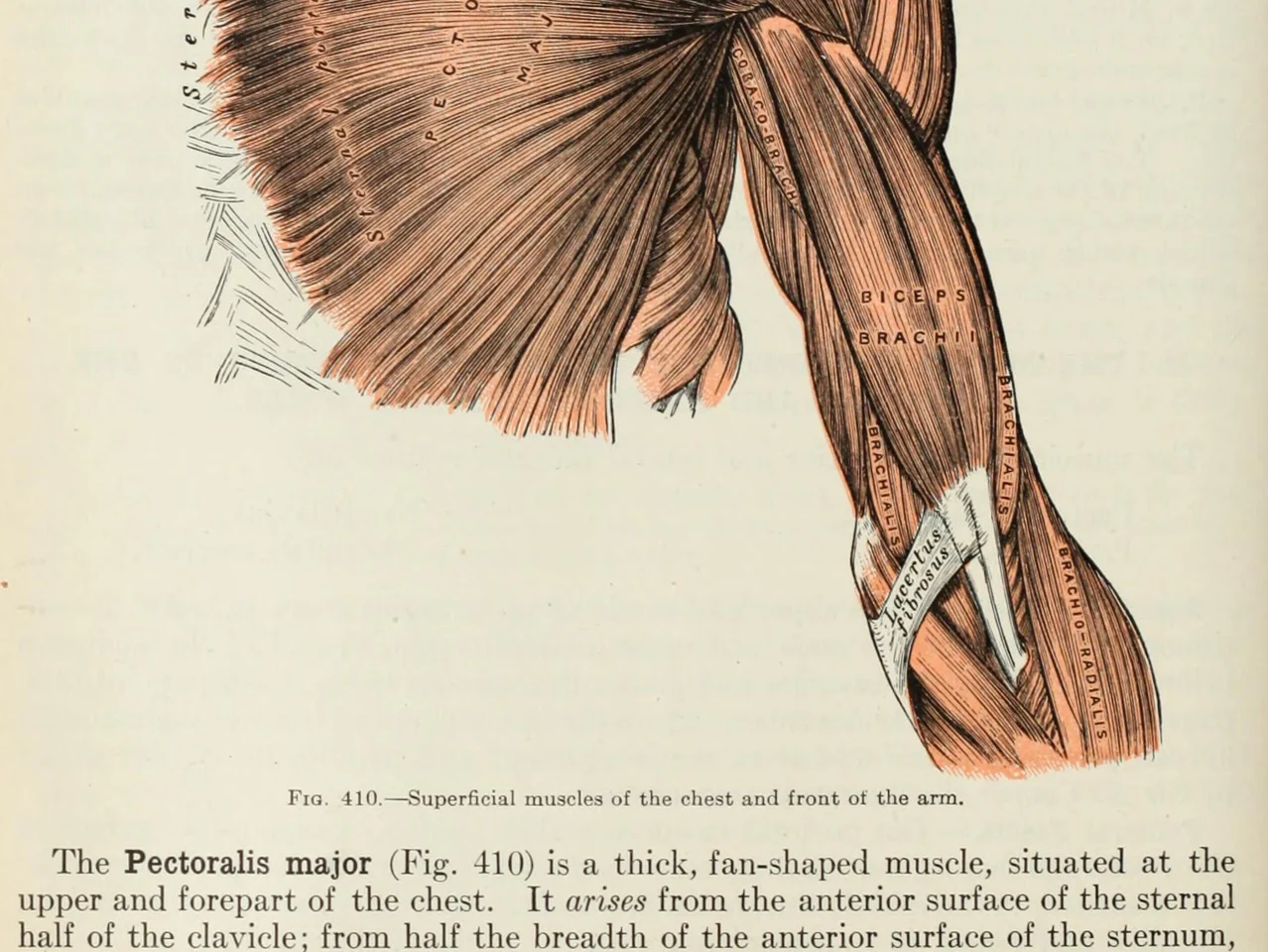
An anatomy plate of the muscles of the arm, each one labelled inside the drawing

Słowa w obrazach. Diagramy, podpisane rysunki, napisy, zrzut ekranu od przyjaciela. Jeśli możesz to przeczytać, LeafyApp też.

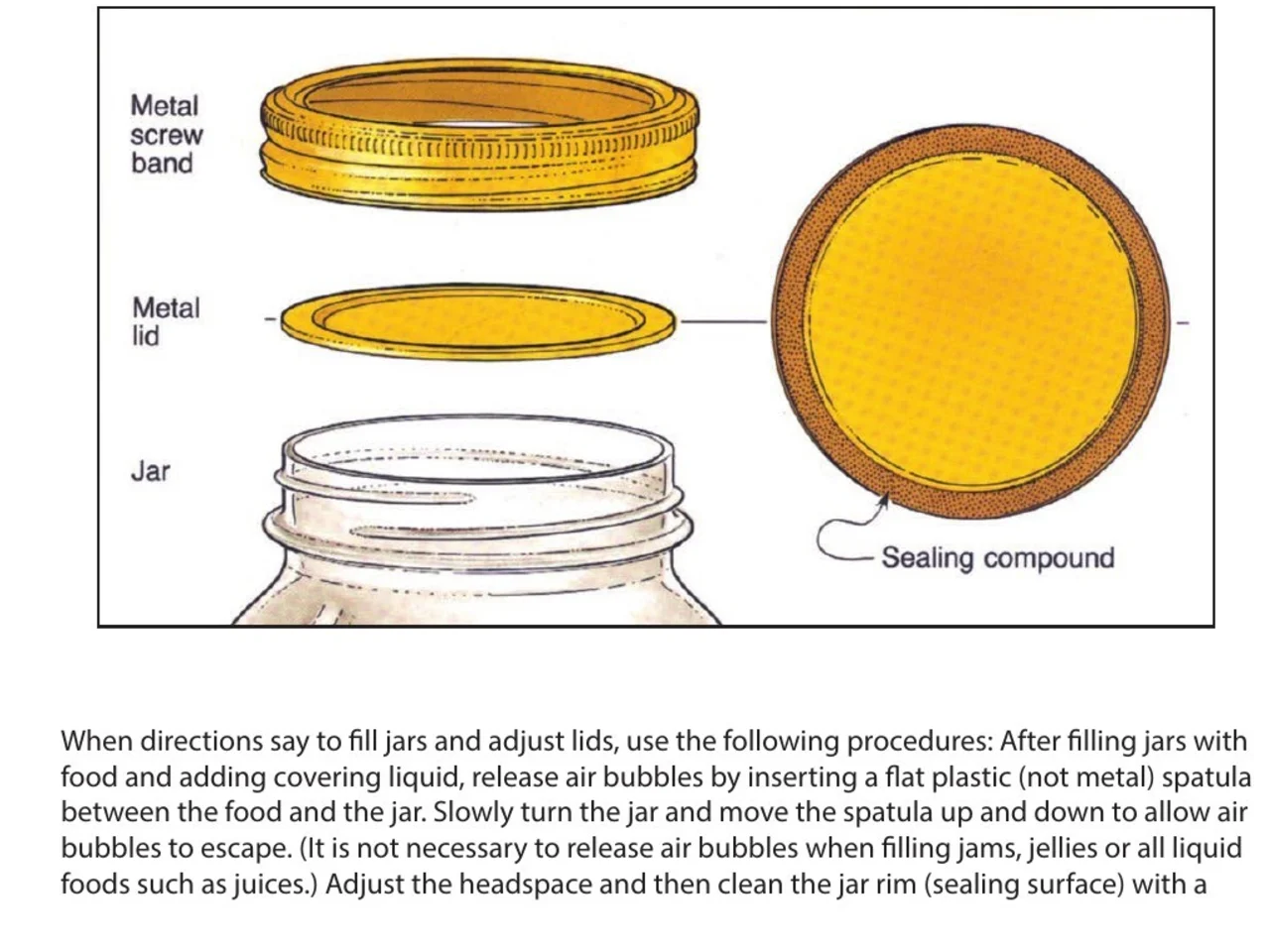
A step-by-step diagram of a canning jar, its screw band, lid and sealing compound each named beside it

Instrukcje i podręczniki. Nazwa części obok jej rysunku w pliku PDF, który nikt nie udostępnił. Zaznacz nazwę, notatka krok, do którego należy.

An engineering drawing of the Space Shuttle payload bay, its parts keyed A to F to a legend beside the drawing

Rysunki i plany. Każda część podpisana linią odnośnika, nic z tego nie tekst. Zaznacz podpis i czytaj, co oznacza.

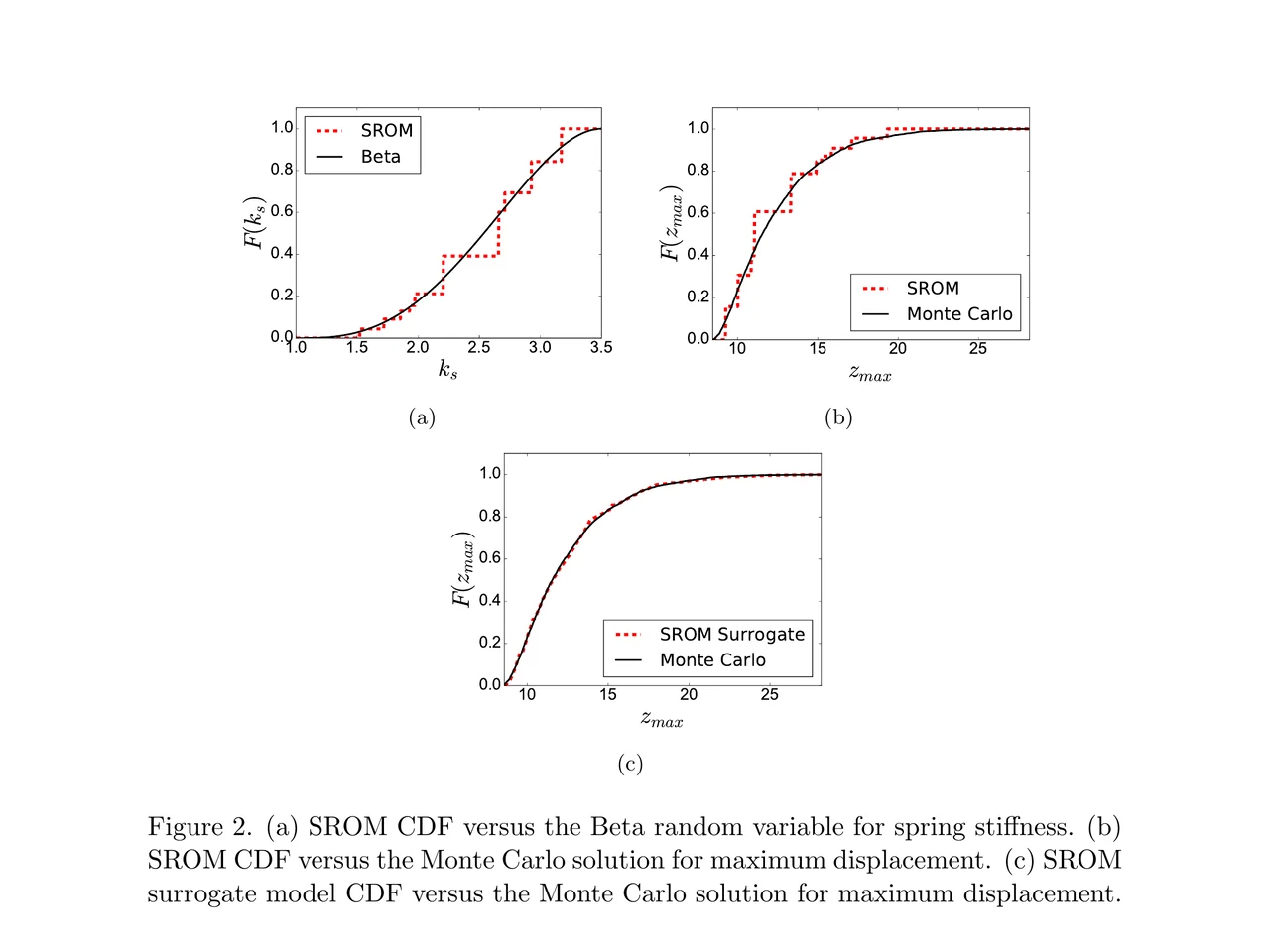
A page of a NASA technical memorandum: three plots and the figure caption under them

Artykuły i ich rysunki. Etykieta osi, pozycja legendy, termin w podpisie. Zaznacz cokolwiek, gdzie leży, bez opuszczania strony.

Przeciągnij do folderu.
Dopisz własną notatkę.

Foldery Przeciągaj słowa do języka, kursu, książki. Każdy folder ma własny licznik.

Skąd pochodzi Każde słowo niesie ze sobą zdanie, źródło i dzień, w którym je znalazłeś.

Zdefiniowane przez zdanie Nie hasło słownikowe pod tym słowem. Znaczenie, jakie ma w linijce, w której je znalazłeś.

W zdaniu, w którym je spotkałeś Słowo wraca w linijce, z której je zapisałeś, z jedną luką. Nie goła fiszka.

Zaplanowane za ciebie FSRS-5, algorytm, na który przeszło Anki. Odstępy od godziny do dziesięciu lat.

Nic do ustawiania Każde sprawdzone słowo już tam jest. Nie ma talii, którą trzeba najpierw zbudować.

Co mówią ludzie

“I have probably cried closer to a quarter as many times in a week.”

pandaprincessTrzeci rok medycyny · Product Hunt

INSANELY responsive developer!! Will expand on this in the points below, since the features I LOVE tie into how responsive the developer is.

I'm currently a medical student who has started clinical rotations, so it is not only learning a lot of names of conditions, drugs and therapeutics on the fly. All of the drugs have both a brand name and a generic name, and on top of that every professional who uses the electronic medical record to write their notes uses abbreviations for the conditions, drugs and procedures.

Through mostly a variety of brainstorming / whining sessions (on my part):

I mentioned that having Leafy reference MY personal list of words and phrases first when scanning would be incredible, since medical abbreviations can mean other things in other contexts (example: SOB should be “shortness of breath”, not “son of a…” anyway). I think within 5 days the next update included that feature.

I mentioned the new feature was working perfectly, but that it might take me a while to build my vocab list in Leafy, and that there was no easy way to import everything I already had in my Anki deck (Anki is the flashcard app most med students rely on). Now the current version has an Anki integration, so with the settings adjusted, scanned words reference YOUR vocab list and/or YOUR Anki deck first, and if you don't have a card for it YOU CAN ADD IT DIRECTLY TO ANKI FROM WITHIN LEAFY.

The fact that this all happens inside the Leafy popup has made reading other providers' notes on the EMR SO much less stressful. Being able to translate a summary statement like “78M hx HTN, HLD, CAD s/p CABG and multiple PCIs, CKD3 transferred from OSH after 2 episodes of right sided vision loss and imaging demonstrating severe stenosis of L ICA” without leaving the screen is SUCH A GAME CHANGER.

I actually cannot rave enough about this app. The 3rd year of medical school is known to induce a good amount of crying from students, just from the sheer volume of information you need to process while studying and while helping care for patients. I have probably cried closer to a quarter as many times in a week, just from the time and frustration saved having an easier time referencing the terms I need, and it is making it 1000x faster for me to actually learn them.

Automatically saved with its surrounding context.

This is super cool! It is so nice that it quizzes you directly on the text you were reading instead of forcing you to build custom study lists.

Being able to scan a word anywhere on my screen and have it automatically saved with its surrounding context makes reviewing my study materials so much faster. I can already tell this will make tackling heavy reading assignments a lot less tedious.

AlawayProduct Hunt

The cleanest macOS app I have ever used.

Leafy saves the words and the contexts while I look up words reading papers, so I can review them later.

The context save is so smart. That is the key to making the word list alive. The AI responses are really fast and give the meaning in context, so I understand immediately. It is best for building a personal word list and reviewing later.

linryicProduct Hunt

It solves this gap brilliantly.

I was in search of a solution out of sheer desperation after constantly running into the limits of macOS’s built-in dictionary, which falls short across many third-party and proprietary applications. That is how I found Leafy.

Leafy’s interface is surprisingly intuitive and straightforward. It runs smoothly even on my older Apple M2 chip and clearly receives ongoing care, supported by a developer that resolves issues quickly.

The application integrates seamlessly with my workflow across a variety of apps, including Anki, Obsidian, Apple Books, Arc, and Discord. I especially appreciate that saved words retain their original context, which significantly boosts retention.

As a feature request for future updates, it would be incredible to have the ability to import custom dictionary files so we can rely on local data sources.

MaxDiscord

Ile to kosztuje

Każde wyszukanie uruchamia AI. Ktoś za nie płaci.

Za darmo

$0/mies.

Trochę skanowania. Za AI płacimy my.

  • 12 wyszukiwań dziennie
  • Historia i statystyka z 7 dni
  • Eksport do CSV

Pobierz LeafyApp

Miesięcznie

$6.99/mies.

Skanuj, ile chcesz. Za AI płacimy my.

  • Nieograniczone wyszukania i tłumaczenia
  • Cała historia i statystyka
  • Eksport do PDF i tabel

Zobacz abonament

Plan roczny

$5/mies.

$59.99 rozliczane rocznie. Oszczędź 29% w stosunku do planu miesięcznego.

  • Nieograniczone wyszukania i tłumaczenia
  • Cała historia i statystyka
  • Eksport do PDF i tabel
  • Dwa miesiące za darmo w stosunku do planu miesięcznego

Przejdź na plan roczny

Chcesz zniżkę?

3,49 $ miesięcznie albo 29,99 $ rocznie, na zawsze.

Dołącz do Discorda

Pytania

Gdzie działa?
  • Wszędzie na ekranie
  • PDF-y
  • E-booki
  • Zeskanowane strony
  • Obrazy
  • Strony WWW
  • Wideo
  • Napisy
  • Pasek PopClip
Jakie języki?
  • Arabski
  • Angielski
  • Francuski
  • Niemiecki
  • Grecki
  • Włoski
  • Japoński
  • Chiński uproszczony
  • Hiszpański
  • Tajski
  • wietnamski
Import i eksport?
Skąd biorą się definicje?

Sztuczna inteligencja czyta słowo razem ze zdaniem, w którym je zapisałeś, więc dostajesz znaczenie, jakie ma właśnie tam, a nie wszystkie znaczenia ze słownika. LeafyApp korzysta z DeepSeek. AI czasem się myli, dlatego oryginalne zdanie zawsze zostaje obok definicji.

Co dokładnie opuszcza mojego Maca?

Słowo i zdanie wokół niego. Nic więcej. Zrzut ekranu służy tylko do wyciągnięcia liter i potem jest odrzucany: nigdy nie trafia na dysk ani nie jest wysyłany. Nie ma konta, więc to, co wychodzi, nie jest przypisane do nikogo.

Czy działa na zeskanowanych plikach PDF?

Tak. LeafyApp wykonuje OCR na zaznaczonym fragmencie, więc zeskanowana strona, zrzut ekranu, napisy czy zdjęcie kartki działają tak samo jak zaznaczalny tekst. Rozpoznawanie działa na twoim Macu, nie na serwerze.

Czy LeafyApp cały czas patrzy na mój ekran?

Nie. Patrzy tylko w momencie naciśnięcia skrótu i tylko na zaznaczony fragment. W tle nic nie działa, a zrzut ekranu nie jest zapisywany ani wysyłany.

A prywatność?
  • Patrzy na ekran tylko wtedy, gdy naciśniesz skrót
  • Zrzut ekranu nie jest zapisywany ani wysyłany
  • Na zewnątrz idzie tylko słowo i jego zdanie
  • Twoja biblioteka zostaje na tym Macu
  • Bez konta, bez reklam
  • Statystyki użycia można wyłączyć
  • Przeczytaj politykę prywatności