

LeafyApp

⌥A over elk woord op je scherm.
Het leest de zin, niet alleen het woord.

Downloaden

macOS 14+, helemaal gratis

Sluit je aan bij andere lezers

Terwijl je leest

She had read the word a hundred times before, but only now, by the river at dawn, did it truly land:
the water was effervescent , and for a moment the whole current seemed to lift and breathe, each ripple catching the first pale light and breaking it into a thousand small bubbles of gold that rose, trembled, and were gone before she could name them. She read the sentence again, slower this time, mouthing the word to feel its shape, and something about the morning, the cold air, the moving water, the hush over everything, made it stay with her for good.

Drie toetsen, dan is het van jou.

Druk op ⌥A Overal, in elke app. De cursor wordt een kader.

Kader het woord in Sleep over wat dan ook op het scherm. Tekst of beeld, het maakt niet uit.

Lees het De betekenis verschijnt onder het woord, in de zin waarin je het tegenkwam.

De pagina's die niemand anders kan selecteren.

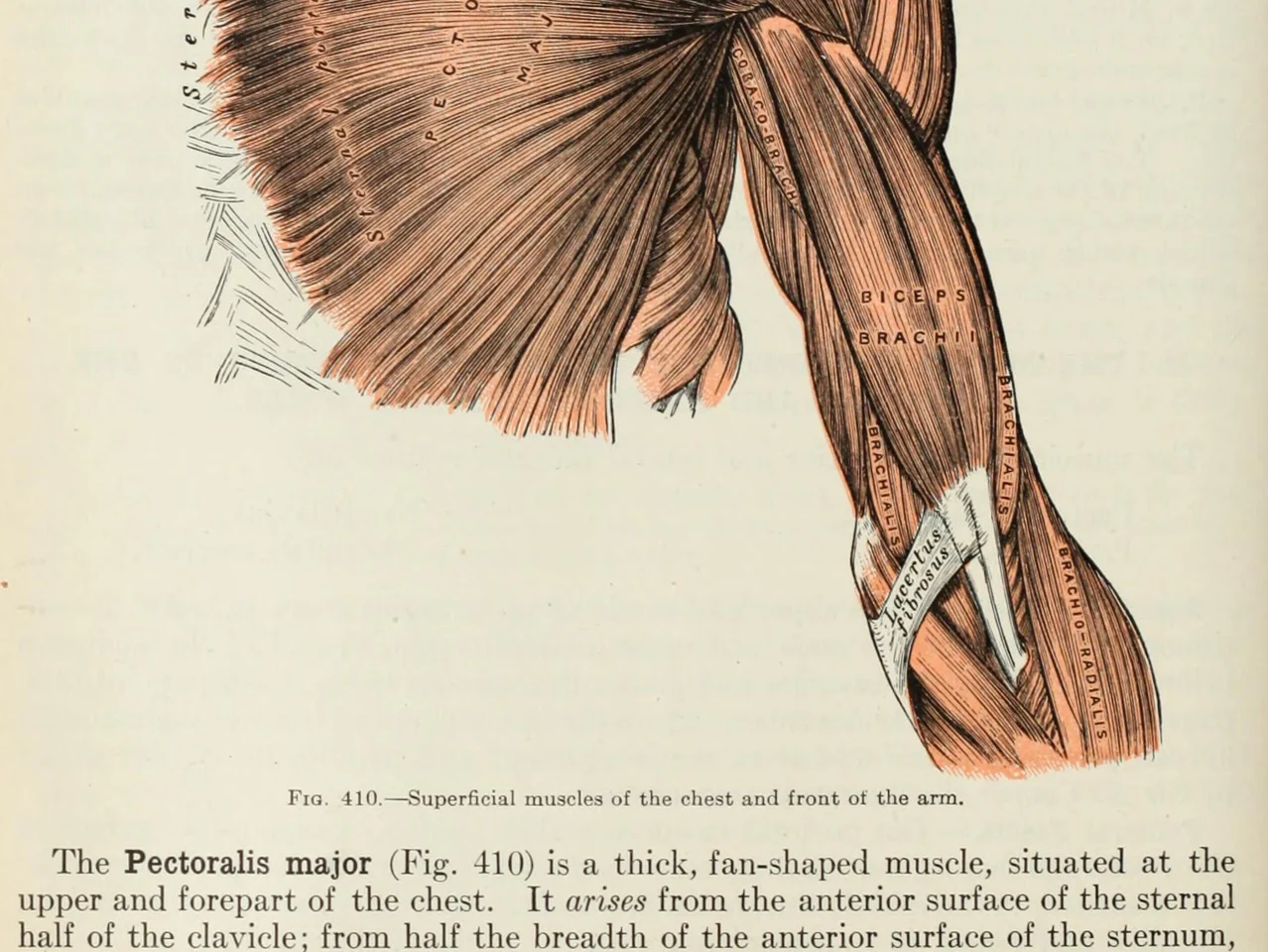
An anatomy plate of the muscles of the arm, each one labelled inside the drawing

Woorden in afbeeldingen. Diagrammen, gelabelde tekeningen, ondertitels, een screenshot die een vriend je stuurde. Als je ogen het kunnen lezen, LeafyApp ook.

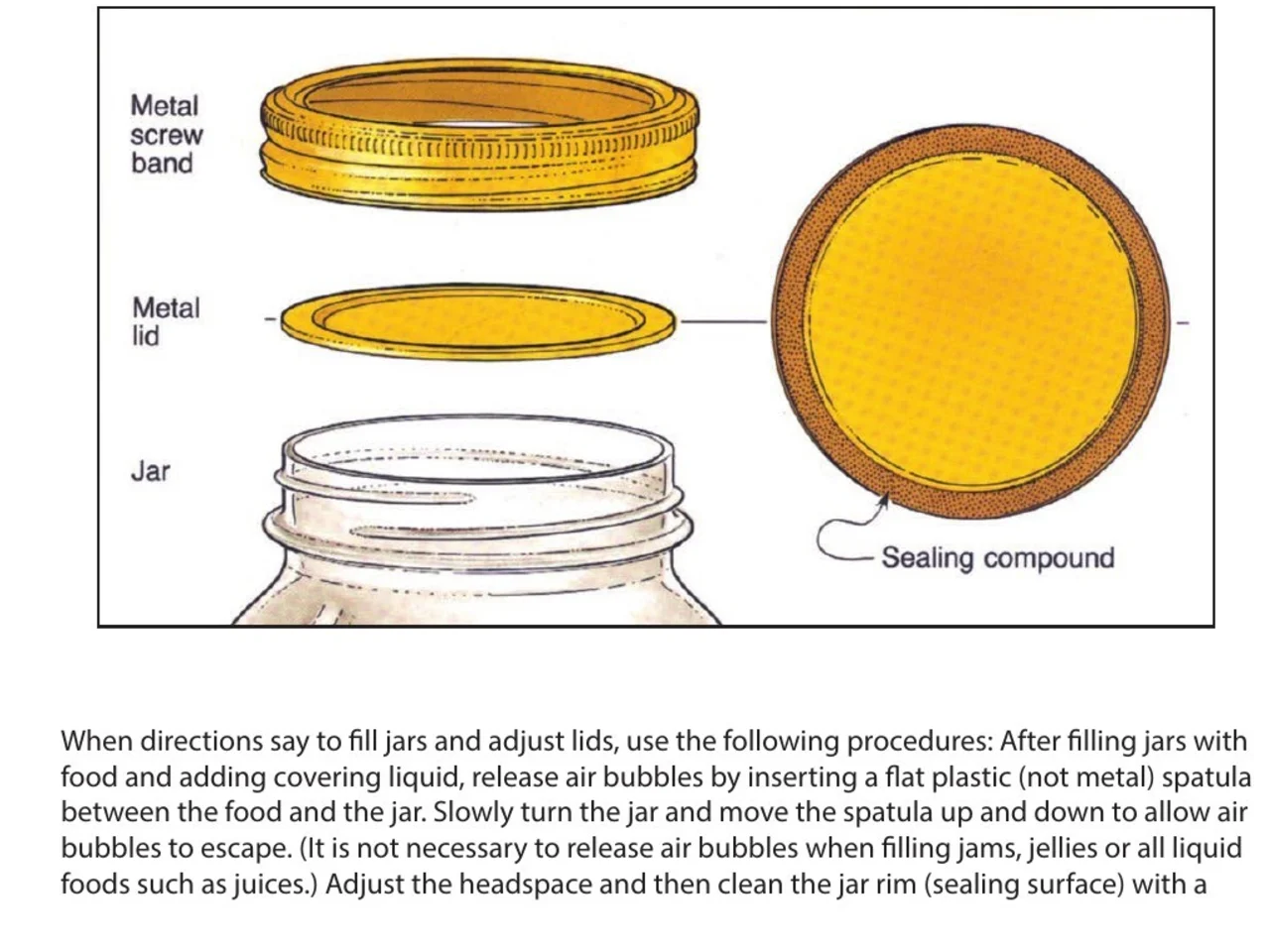
A step-by-step diagram of a canning jar, its screw band, lid and sealing compound each named beside it

Instructies en handleidingen. Het onderdeel dat je nodig hebt benoemd naast de tekening ervan, in een PDF die niemand anders selecteerbaar maakte. Teken eromheen, houd de stap vast waar het bij hoort.

An engineering drawing of the Space Shuttle payload bay, its parts keyed A to F to a legend beside the drawing

Tekeningen en plannen. Elk onderdeel benoemd op een hulplijn, geen ervan is tekst. Trek een kader eromheen en lees wat het betekent.

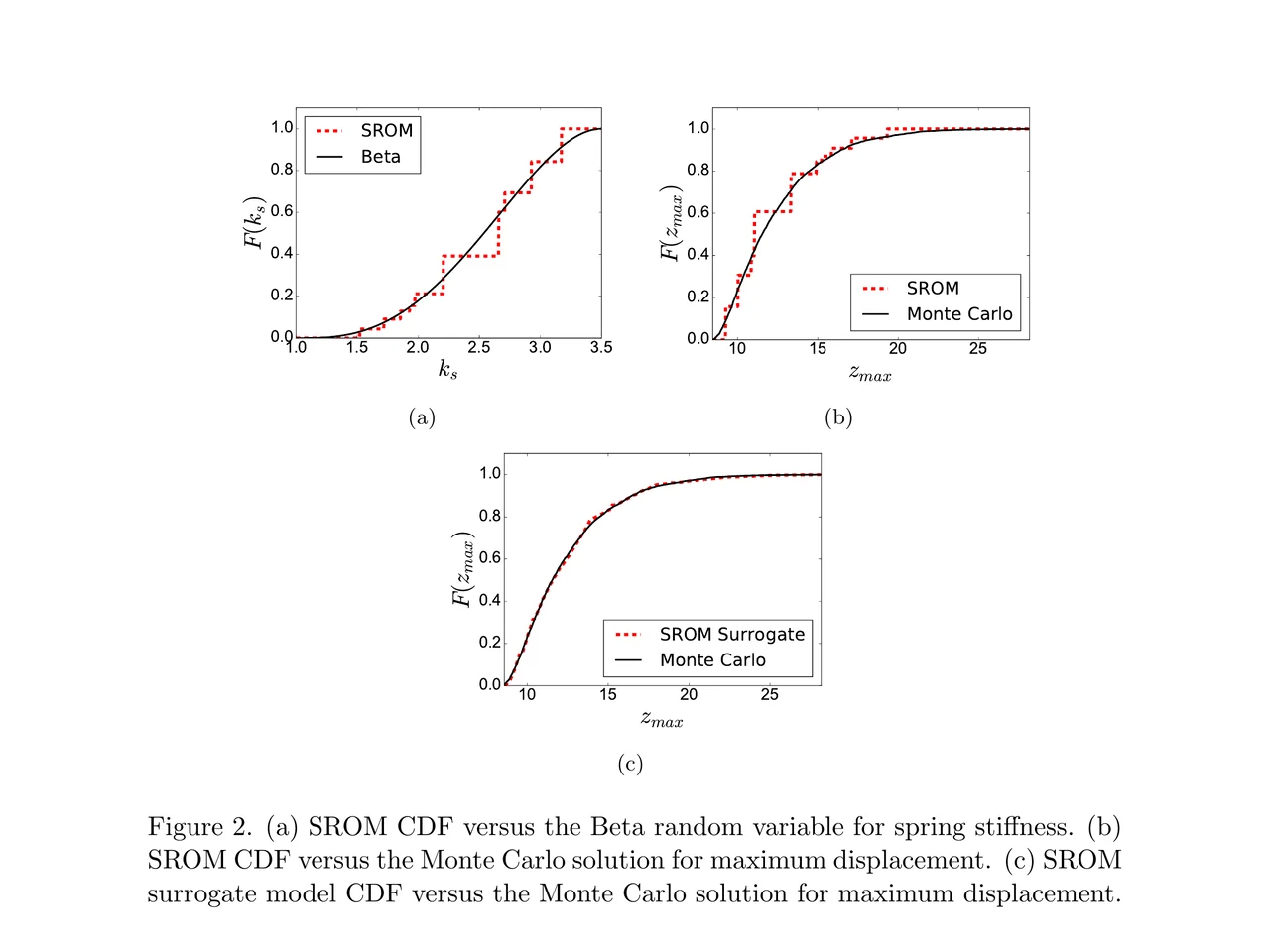
A page of a NASA technical memorandum: three plots and the figure caption under them

Publicaties en hun figuren. Een aslabel, een legendaitem, een term in het bijschrift. Trek eromheen waar het zit, zonder de pagina te verlaten.

Sleep het naar een map.
Schrijf je eigen notitie.

Mappen Sleep woorden naar een taal, een cursus, een boek. Elke map houdt zijn eigen telling bij.

Waar het vandaan kwam Elk woord draagt de zin, de bron en de dag waarop je het vond.

Bepaald door de zin Niet het woordenboeklemma onder het woord. De betekenis die het heeft in de regel waarin je het vond.

In de zin waarin je het tegenkwam Het woord komt terug in de regel waaruit je het opsloeg, met één gat. Geen kale kaart.

Voor je ingepland FSRS-5, het algoritme waar Anki naar overstapte. Intervallen van een uur tot tien jaar.

Niets in te stellen Elk woord dat je opzocht zit er al in. Er is geen stapel die je eerst moet bouwen.

Wat mensen zeggen

“I have probably cried closer to a quarter as many times in a week.”

pandaprincessDerde jaar geneeskunde · Product Hunt

INSANELY responsive developer!! Will expand on this in the points below, since the features I LOVE tie into how responsive the developer is.

I'm currently a medical student who has started clinical rotations, so it is not only learning a lot of names of conditions, drugs and therapeutics on the fly. All of the drugs have both a brand name and a generic name, and on top of that every professional who uses the electronic medical record to write their notes uses abbreviations for the conditions, drugs and procedures.

Through mostly a variety of brainstorming / whining sessions (on my part):

I mentioned that having Leafy reference MY personal list of words and phrases first when scanning would be incredible, since medical abbreviations can mean other things in other contexts (example: SOB should be “shortness of breath”, not “son of a…” anyway). I think within 5 days the next update included that feature.

I mentioned the new feature was working perfectly, but that it might take me a while to build my vocab list in Leafy, and that there was no easy way to import everything I already had in my Anki deck (Anki is the flashcard app most med students rely on). Now the current version has an Anki integration, so with the settings adjusted, scanned words reference YOUR vocab list and/or YOUR Anki deck first, and if you don't have a card for it YOU CAN ADD IT DIRECTLY TO ANKI FROM WITHIN LEAFY.

The fact that this all happens inside the Leafy popup has made reading other providers' notes on the EMR SO much less stressful. Being able to translate a summary statement like “78M hx HTN, HLD, CAD s/p CABG and multiple PCIs, CKD3 transferred from OSH after 2 episodes of right sided vision loss and imaging demonstrating severe stenosis of L ICA” without leaving the screen is SUCH A GAME CHANGER.

I actually cannot rave enough about this app. The 3rd year of medical school is known to induce a good amount of crying from students, just from the sheer volume of information you need to process while studying and while helping care for patients. I have probably cried closer to a quarter as many times in a week, just from the time and frustration saved having an easier time referencing the terms I need, and it is making it 1000x faster for me to actually learn them.

Automatically saved with its surrounding context.

This is super cool! It is so nice that it quizzes you directly on the text you were reading instead of forcing you to build custom study lists.

Being able to scan a word anywhere on my screen and have it automatically saved with its surrounding context makes reviewing my study materials so much faster. I can already tell this will make tackling heavy reading assignments a lot less tedious.

AlawayProduct Hunt

The cleanest macOS app I have ever used.

Leafy saves the words and the contexts while I look up words reading papers, so I can review them later.

The context save is so smart. That is the key to making the word list alive. The AI responses are really fast and give the meaning in context, so I understand immediately. It is best for building a personal word list and reviewing later.

linryicProduct Hunt

It solves this gap brilliantly.

I was in search of a solution out of sheer desperation after constantly running into the limits of macOS’s built-in dictionary, which falls short across many third-party and proprietary applications. That is how I found Leafy.

Leafy’s interface is surprisingly intuitive and straightforward. It runs smoothly even on my older Apple M2 chip and clearly receives ongoing care, supported by a developer that resolves issues quickly.

The application integrates seamlessly with my workflow across a variety of apps, including Anki, Obsidian, Apple Books, Arc, and Discord. I especially appreciate that saved words retain their original context, which significantly boosts retention.

As a feature request for future updates, it would be incredible to have the ability to import custom dictionary files so we can rely on local data sources.

MaxDiscord

Wat het kost

Elke opzoeking laat een AI draaien. Iemand betaalt die.

Gratis

$0/mnd

Af en toe scannen. De AI betalen wij.

  • 12 opzoekingen per dag
  • 7 dagen geschiedenis en statistieken
  • Exporteer naar CSV

LeafyApp downloaden

Maandelijks

$6.99/mnd

Scannen zoveel je wilt. De AI betalen wij.

  • Onbeperkt opzoekingen en vertalingen
  • Onbeperkt geschiedenis en statistieken
  • Exporteer ook naar Anki, Excel, JSON en PDF

Bekijk maandelijks

Jaarlijks

$5/mnd

$59,99 jaarlijks gefactureerd. Bespaar 29% ten opzichte van Maandelijks.

  • Onbeperkt opzoekingen en vertalingen
  • Onbeperkt geschiedenis en statistieken
  • Exporteer ook naar Anki, Excel, JSON en PDF
  • Twee maanden gratis ten opzichte van Maandelijks

Bekijk Jaarlijks

Wil je korting?

$3,49 per maand of $29,99 per jaar, voor altijd.

Kom in de Discord

Vragen

Waar werkt het?
  • Overal op het scherm
  • Pdf's
  • E-books
  • Gescande pagina's
  • Afbeeldingen
  • Webpagina's
  • Video
  • Ondertitels
  • De PopClip-balk
Welke talen?
  • Arabisch
  • Engels
  • Frans
  • Duits
  • Grieks
  • Italiaans
  • Japans
  • Vereenvoudigd Chinees
  • Spaans
  • Thai
  • Vietnamees
Importeren en exporteren?
  • Anki
  • CSV
  • Excel
  • JSON
  • PDF
  • Importeren uit een sjabloon
Waar komen de betekenissen vandaan?

Een AI leest het woord samen met de zin waarin je het bewaarde, dus je krijgt de betekenis die het daar heeft, niet elke betekenis uit het woordenboek. LeafyApp gebruikt hiervoor DeepSeek. AI zit er soms naast, daarom blijft de oorspronkelijke zin altijd naast de betekenis staan.

Wat verlaat mijn Mac precies?

Het woord en de zin eromheen. Verder niets. De schermafbeelding wordt alleen gebruikt om de letters eruit te halen en daarna weggegooid: nooit naar schijf geschreven, nooit geüpload. Er is geen account, dus wat naar buiten gaat hangt aan niemands naam.

Werkt het op gescande pdf's?

Ja. LeafyApp doet OCR op het kader dat je trekt, dus een gescande pagina, een schermafbeelding, een ondertitel of een foto van een bladzijde werken net als selecteerbare tekst. De herkenning draait op je Mac, niet op een server.

Kijkt LeafyApp de hele tijd mee op mijn scherm?

Nee. Alleen op het moment dat je de sneltoets indrukt, en alleen naar het kader dat je trekt. Op de achtergrond draait niets, en de schermafbeelding wordt niet bewaard en niet verstuurd.

En privacy?
  • Hij kijkt alleen mee als je de sneltoets indrukt
  • De schermafbeelding wordt niet bewaard en niet verstuurd
  • Alleen het woord en de zin eromheen gaan naar buiten
  • Je bibliotheek blijft op deze Mac
  • Geen account, geen advertenties
  • Gebruiksstatistieken kun je uitzetten
  • Lees het privacybeleid