

LeafyApp

画面のどの単語にも ⌥A。単語だけでなく、その文を読みます。

ダウンロード

macOS 14+、完全無料

他の読者と一緒に

読んでいる最中に

She had read the word a hundred times before, but only now, by the river at dawn, did it truly land:
the water was effervescent , and for a moment the whole current seemed to lift and breathe, each ripple catching the first pale light and breaking it into a thousand small bubbles of gold that rose, trembled, and were gone before she could name them. She read the sentence again, slower this time, mouthing the word to feel its shape, and something about the morning, the cold air, the moving water, the hush over everything, made it stay with her for good.

キー3つで、自分のものに。

⌥A を押す どこでも、どのアプリでも。カーソルが枠になる。

単語を囲む 画面の上をドラッグするだけ。文字でも画像でも同じ。

読む 意味が単語の下に、出会った文の中で表示される。

他のアプリでは選べないページ。

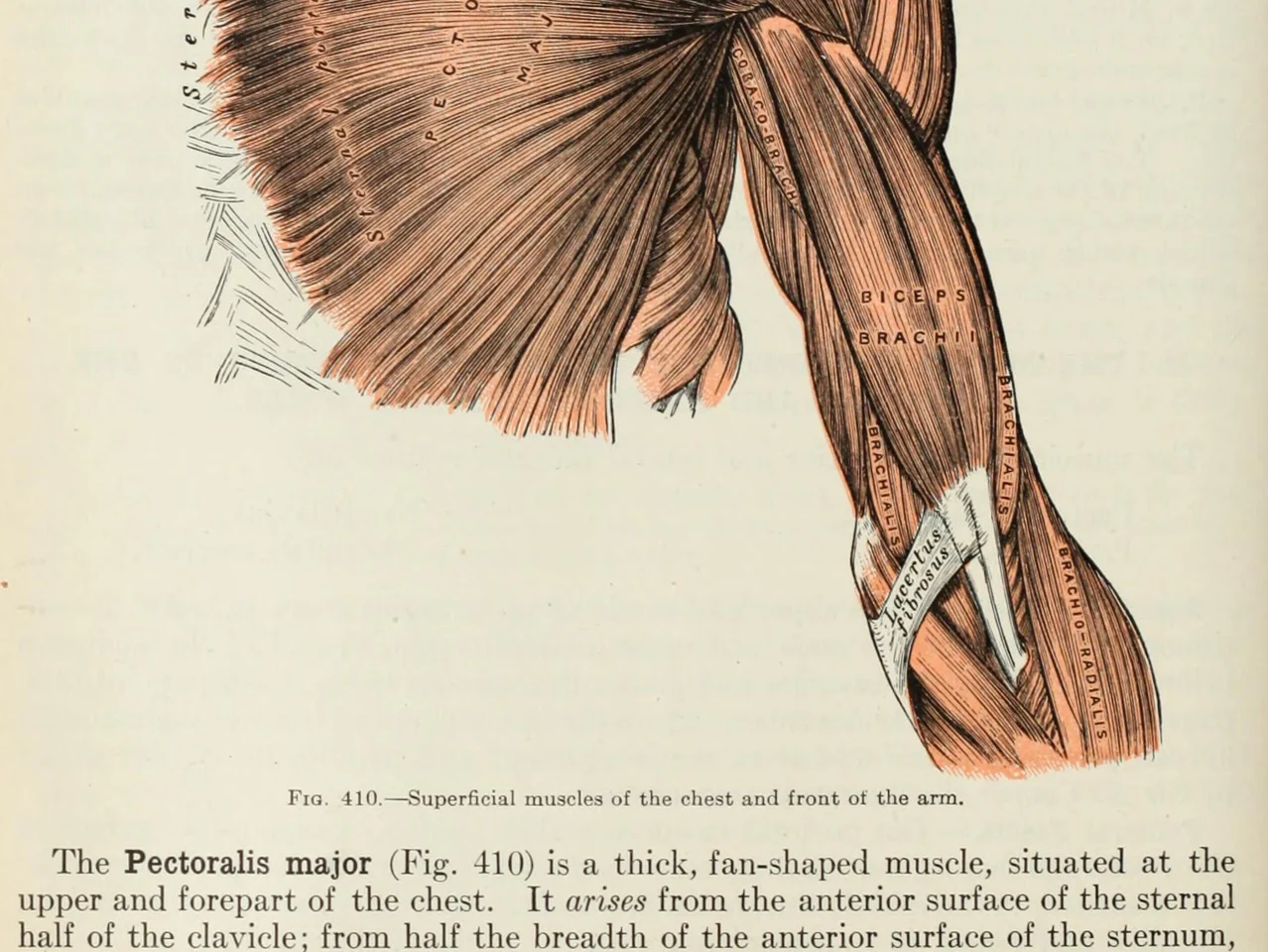
An anatomy plate of the muscles of the arm, each one labelled inside the drawing

画像の中の単語。 図解、ラベル付きの図、字幕、友人が送ってくれたスクリーンショット。あなたの目で読めたら、LeafyApp も読めます。

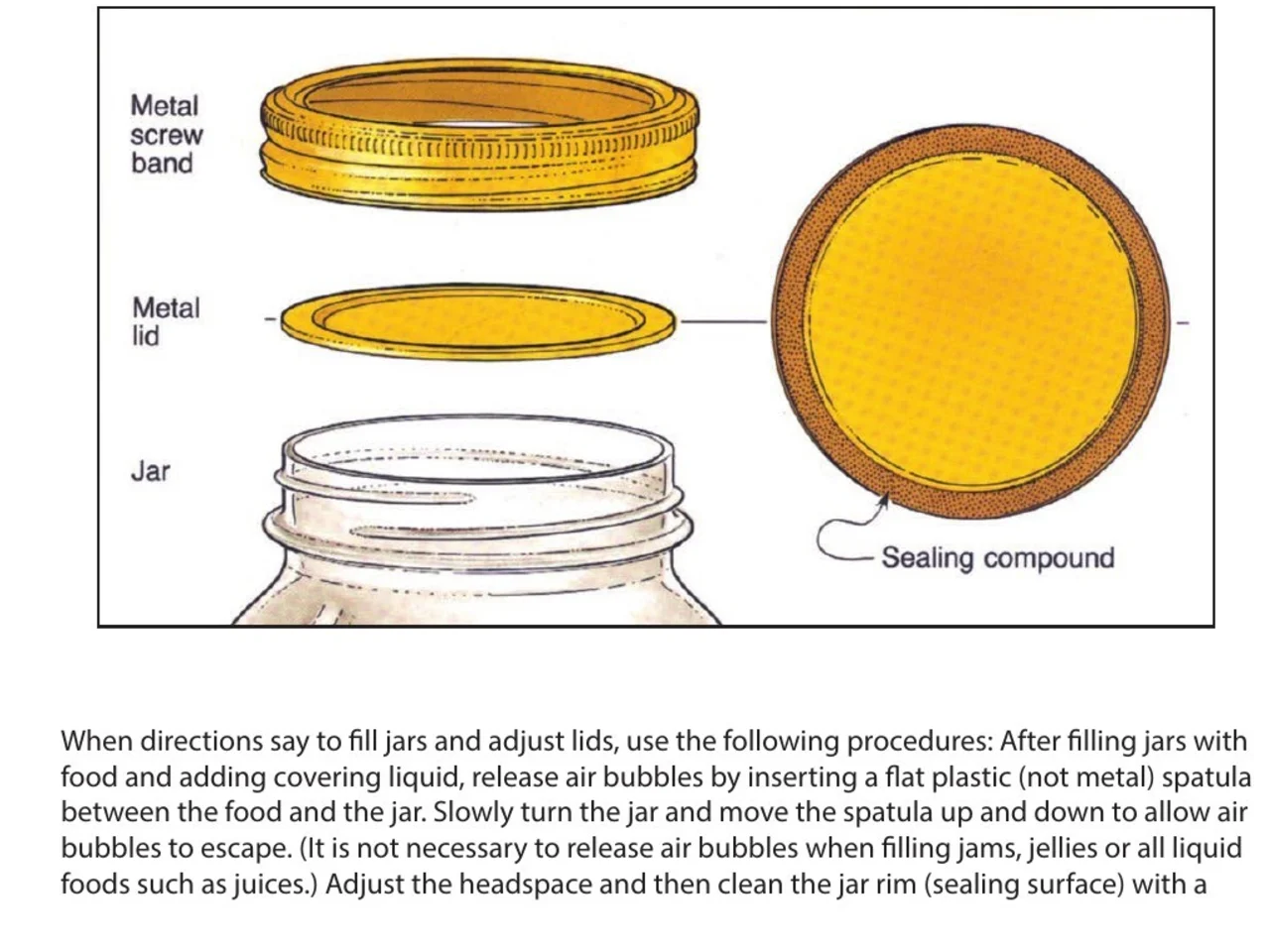
A step-by-step diagram of a canning jar, its screw band, lid and sealing compound each named beside it

指示書と取扱説明書。 必要な部分が、その隣の図に名前が付いてて、誰も選択可能にしなかった PDF。その名前を囲んで、属する工程ごと keep します。

An engineering drawing of the Space Shuttle payload bay, its parts keyed A to F to a legend beside the drawing

図面と平面図。 部分の全部が leader line で名前が付き、テキストがない。ラベルを囲んで、それが何を意味するか読みます。

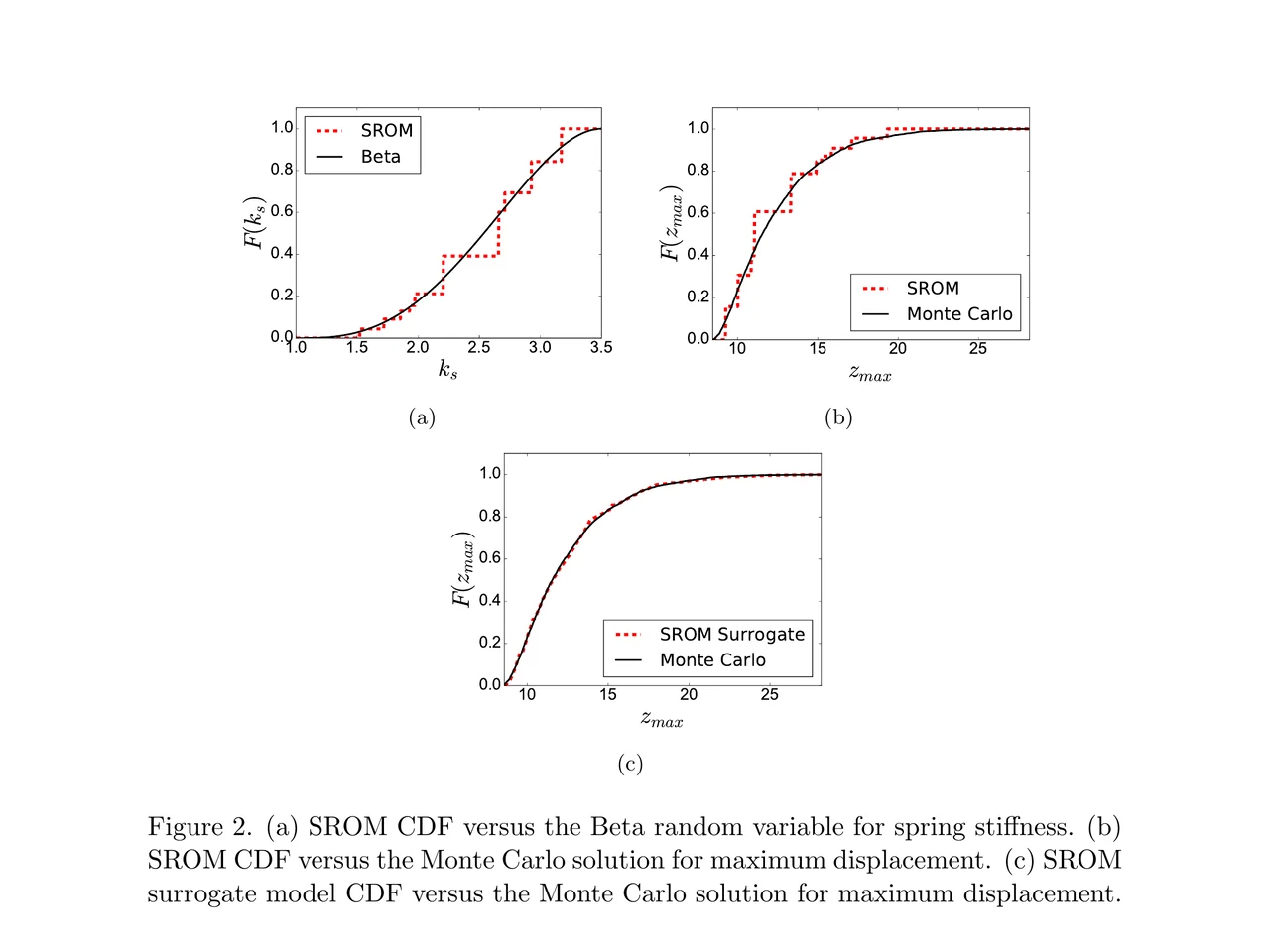
A page of a NASA technical memorandum: three plots and the figure caption under them

論文と図表。 軸のラベル、legend の entry、caption の用語。どれでも囲んで、ページを離れずに読みます。

フォルダにドラッグ。
自分のメモを書く。

フォルダ 言語、講義、本ごとにドラッグして分ける。それぞれが件数を持つ。

出どころ どの単語にも、その文、出典、見つけた日が付いている。

文が決める意味 辞書でその単語に載っている項目ではなく、その一行の中で持っている意味。

出会った文の中で 保存した文の中に、その単語が一語だけ空欄になって戻ってくる。裸のカードではない。

復習の予定は自動 Anki が移行したアルゴリズム FSRS-5。間隔は1時間から10年まで。

準備はいらない 調べた単語はすべてもう入っている。先に作るデッキはない。

利用者の声

“I have probably cried closer to a quarter as many times in a week.”

pandaprincess医学部3年 · Product Hunt

INSANELY responsive developer!! Will expand on this in the points below, since the features I LOVE tie into how responsive the developer is.

I'm currently a medical student who has started clinical rotations, so it is not only learning a lot of names of conditions, drugs and therapeutics on the fly. All of the drugs have both a brand name and a generic name, and on top of that every professional who uses the electronic medical record to write their notes uses abbreviations for the conditions, drugs and procedures.

Through mostly a variety of brainstorming / whining sessions (on my part):

I mentioned that having Leafy reference MY personal list of words and phrases first when scanning would be incredible, since medical abbreviations can mean other things in other contexts (example: SOB should be “shortness of breath”, not “son of a…” anyway). I think within 5 days the next update included that feature.

I mentioned the new feature was working perfectly, but that it might take me a while to build my vocab list in Leafy, and that there was no easy way to import everything I already had in my Anki deck (Anki is the flashcard app most med students rely on). Now the current version has an Anki integration, so with the settings adjusted, scanned words reference YOUR vocab list and/or YOUR Anki deck first, and if you don't have a card for it YOU CAN ADD IT DIRECTLY TO ANKI FROM WITHIN LEAFY.

The fact that this all happens inside the Leafy popup has made reading other providers' notes on the EMR SO much less stressful. Being able to translate a summary statement like “78M hx HTN, HLD, CAD s/p CABG and multiple PCIs, CKD3 transferred from OSH after 2 episodes of right sided vision loss and imaging demonstrating severe stenosis of L ICA” without leaving the screen is SUCH A GAME CHANGER.

I actually cannot rave enough about this app. The 3rd year of medical school is known to induce a good amount of crying from students, just from the sheer volume of information you need to process while studying and while helping care for patients. I have probably cried closer to a quarter as many times in a week, just from the time and frustration saved having an easier time referencing the terms I need, and it is making it 1000x faster for me to actually learn them.

Automatically saved with its surrounding context.

This is super cool! It is so nice that it quizzes you directly on the text you were reading instead of forcing you to build custom study lists.

Being able to scan a word anywhere on my screen and have it automatically saved with its surrounding context makes reviewing my study materials so much faster. I can already tell this will make tackling heavy reading assignments a lot less tedious.

AlawayProduct Hunt

The cleanest macOS app I have ever used.

Leafy saves the words and the contexts while I look up words reading papers, so I can review them later.

The context save is so smart. That is the key to making the word list alive. The AI responses are really fast and give the meaning in context, so I understand immediately. It is best for building a personal word list and reviewing later.

linryicProduct Hunt

It solves this gap brilliantly.

I was in search of a solution out of sheer desperation after constantly running into the limits of macOS’s built-in dictionary, which falls short across many third-party and proprietary applications. That is how I found Leafy.

Leafy’s interface is surprisingly intuitive and straightforward. It runs smoothly even on my older Apple M2 chip and clearly receives ongoing care, supported by a developer that resolves issues quickly.

The application integrates seamlessly with my workflow across a variety of apps, including Anki, Obsidian, Apple Books, Arc, and Discord. I especially appreciate that saved words retain their original context, which significantly boosts retention.

As a feature request for future updates, it would be incredible to have the ability to import custom dictionary files so we can rely on local data sources.

MaxDiscord

料金

検索するたびに AI が動きます。誰かがその費用を払っています。

無料

$0/月

少しだけスキャン。AI 代はこちら持ち。

  • 1日12回まで
  • 7 日間の履歴と統計
  • CSV に書き出し

LeafyApp をダウンロード

月額

$6.99/月

好きなだけスキャン。AI 代はこちら持ち。

  • 調べるのも翻訳も無制限
  • 履歴と統計をすべて
  • Anki、Excel、JSON、PDFにも書き出せます

月額を見る

年払い

$5/月

$59.99 年間で請求されます。 月額比 29% お得。

  • 調べるのも翻訳も無制限
  • 履歴と統計をすべて
  • Anki、Excel、JSON、PDFにも書き出せます
  • 2 か月無料 月額と比べて

年度を見る

割引がほしい?

月 3.49 ドル、または年 29.99 ドルでずっと。

Discord に参加

よくある質問

どこで使える?
  • 画面上のどこでも
  • PDF
  • 電子書籍
  • スキャンしたページ
  • 画像
  • ウェブページ
  • 動画
  • 字幕
  • PopClip バー
対応言語は?
  • アラビア語
  • 英語
  • フランス語
  • ドイツ語
  • ギリシャ語
  • イタリア語
  • 日本語
  • 簡体字中国語
  • スペイン語
  • タイ語
  • ベトナム語
読み込みと書き出しは?
語義はどこから来るのですか?

AI が単語と、保存したときの文をあわせて読みます。だから辞書の全語義ではなく、その文での意味が返ってきます。LeafyApp は DeepSeek を使っています。AI は間違えることがあるので、元の文は常に語義の隣に残しています。

Mac から出ていくものは何ですか?

単語と、その周りの文だけです。それ以外はありません。スクリーンショットは文字を取り出すためだけに使われ、その後は破棄されます。ディスクに書き込まれず、アップロードもされません。アカウントがないので、出ていくものは誰の名前にも紐づきません。

スキャンした PDF でも使えますか?

はい。囲んだ範囲を LeafyApp が OCR で読み取るので、スキャン画像、スクリーンショット、字幕、紙面の写真も、選択できるテキストと同じように使えます。認識はサーバーではなく、お使いの Mac 上で動きます。

LeafyApp はずっと画面を見ていますか?

いいえ。ショートカットを押した瞬間だけ、しかも囲った範囲だけを見ます。バックグラウンドでは何も動かず、スクリーンショットは保存も送信もしません。

プライバシーは?
  • ショートカットを押したときだけ画面を見ます
  • スクリーンショットは保存も送信もしません
  • 外に出るのは単語とその一文だけ
  • 単語帳はこの Mac の中だけ
  • アカウントなし、広告なし
  • 利用統計はオフにできます
  • プライバシーポリシーを読む