

LeafyApp

⌥A sobre cualquier palabra en pantalla.
Lee la frase, no solo la palabra.

Descargar

macOS 14+, totalmente gratis

Únete a otros lectores

Mientras lees

She had read the word a hundred times before, but only now, by the river at dawn, did it truly land:
the water was effervescent , and for a moment the whole current seemed to lift and breathe, each ripple catching the first pale light and breaking it into a thousand small bubbles of gold that rose, trembled, and were gone before she could name them. She read the sentence again, slower this time, mouthing the word to feel its shape, and something about the morning, the cold air, the moving water, the hush over everything, made it stay with her for good.

Tres teclas y es tuya.

Pulsa ⌥A En cualquier sitio, en cualquier app. El cursor se convierte en un recuadro.

Encuadra la palabra Arrastra sobre cualquier cosa en pantalla. Texto o imagen, da igual.

Léela El significado aparece bajo la palabra, en la frase donde la encontraste.

Las páginas que nadie más puede seleccionar.

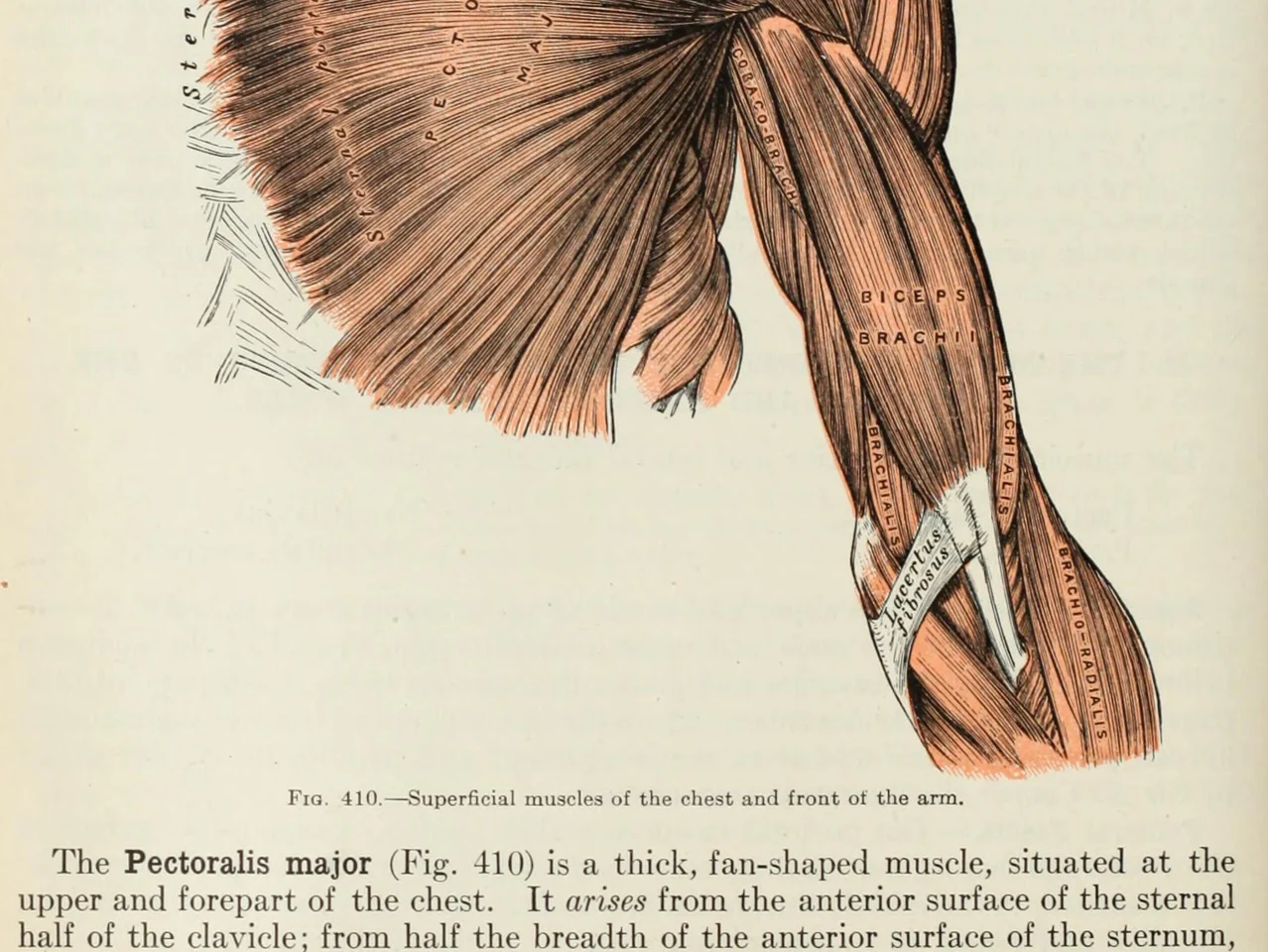
An anatomy plate of the muscles of the arm, each one labelled inside the drawing

Palabras dentro de imágenes. Diagramas, dibujos etiquetados, subtítulos, una captura que te envió un amigo. Si tus ojos pueden leerlo, LeafyApp también.

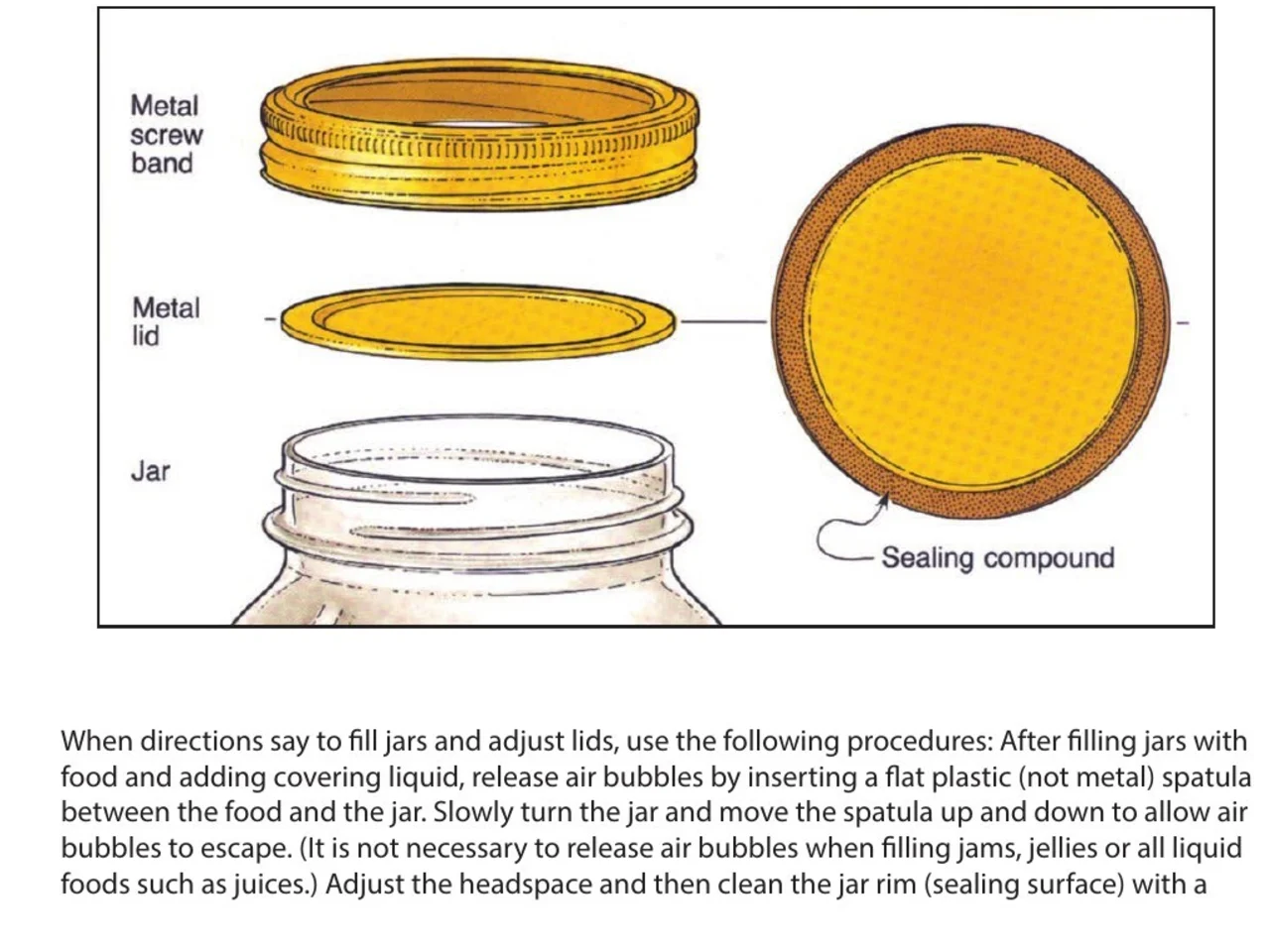
A step-by-step diagram of a canning jar, its screw band, lid and sealing compound each named beside it

Instrucciones y manuales. La parte que necesitas nombrada junto al dibujo de la misma, en un PDF que nadie hizo seleccionable. Encuadra el nombre, mantén el paso al que pertenece.

An engineering drawing of the Space Shuttle payload bay, its parts keyed A to F to a legend beside the drawing

Dibujos y planos. Cada parte nombrada en una línea guía, nada de ello es texto. Encuadra la etiqueta y lee lo que significa.

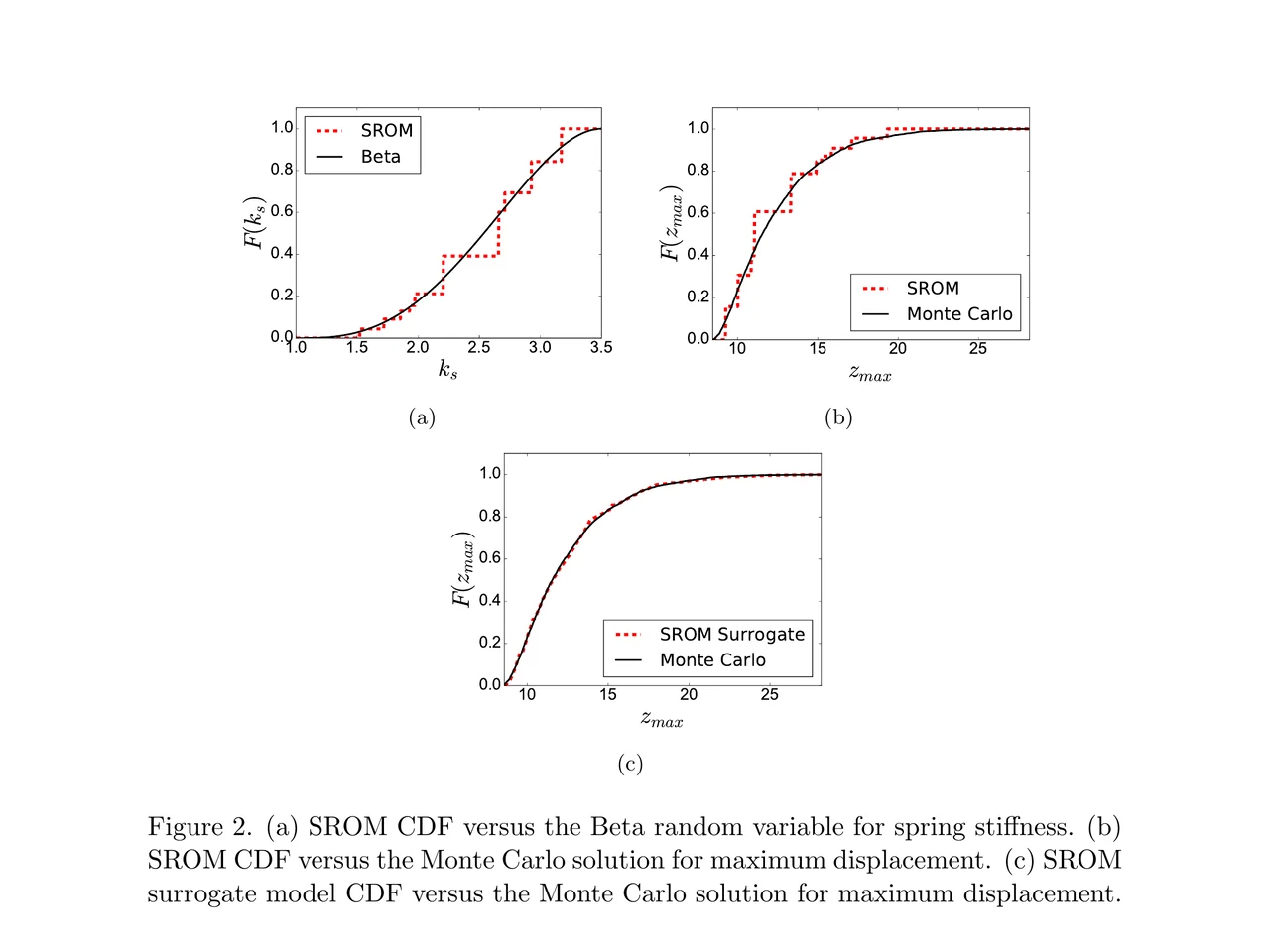
A page of a NASA technical memorandum: three plots and the figure caption under them

Artículos y sus figuras. Una etiqueta de eje, una entrada de leyenda, un término en la leyenda. Encuadra cualquiera de ellos donde está, sin salir de la página.

Arrástrala a una carpeta.
Escribe tu propia nota.

Carpetas Arrastra palabras a un idioma, un curso, un libro. Cada carpeta lleva su propia cuenta.

De dónde salió Cada palabra guarda la frase, la fuente y el día en que la encontraste.

Definida por la frase No la entrada del diccionario bajo la palabra. El sentido que tiene en la línea donde la encontraste.

En la frase donde la viste La palabra vuelve dentro de la línea de la que la guardaste, con un hueco. No una tarjeta pelada.

Programado por ti FSRS-5, el algoritmo al que se pasó Anki. Intervalos de una hora a diez años.

Nada que preparar Cada palabra que buscaste ya está dentro. No hay mazo que construir antes.

Lo que dice la gente

“I have probably cried closer to a quarter as many times in a week.”

pandaprincessTercer año de medicina · Product Hunt

INSANELY responsive developer!! Will expand on this in the points below, since the features I LOVE tie into how responsive the developer is.

I'm currently a medical student who has started clinical rotations, so it is not only learning a lot of names of conditions, drugs and therapeutics on the fly. All of the drugs have both a brand name and a generic name, and on top of that every professional who uses the electronic medical record to write their notes uses abbreviations for the conditions, drugs and procedures.

Through mostly a variety of brainstorming / whining sessions (on my part):

I mentioned that having Leafy reference MY personal list of words and phrases first when scanning would be incredible, since medical abbreviations can mean other things in other contexts (example: SOB should be “shortness of breath”, not “son of a…” anyway). I think within 5 days the next update included that feature.

I mentioned the new feature was working perfectly, but that it might take me a while to build my vocab list in Leafy, and that there was no easy way to import everything I already had in my Anki deck (Anki is the flashcard app most med students rely on). Now the current version has an Anki integration, so with the settings adjusted, scanned words reference YOUR vocab list and/or YOUR Anki deck first, and if you don't have a card for it YOU CAN ADD IT DIRECTLY TO ANKI FROM WITHIN LEAFY.

The fact that this all happens inside the Leafy popup has made reading other providers' notes on the EMR SO much less stressful. Being able to translate a summary statement like “78M hx HTN, HLD, CAD s/p CABG and multiple PCIs, CKD3 transferred from OSH after 2 episodes of right sided vision loss and imaging demonstrating severe stenosis of L ICA” without leaving the screen is SUCH A GAME CHANGER.

I actually cannot rave enough about this app. The 3rd year of medical school is known to induce a good amount of crying from students, just from the sheer volume of information you need to process while studying and while helping care for patients. I have probably cried closer to a quarter as many times in a week, just from the time and frustration saved having an easier time referencing the terms I need, and it is making it 1000x faster for me to actually learn them.

Automatically saved with its surrounding context.

This is super cool! It is so nice that it quizzes you directly on the text you were reading instead of forcing you to build custom study lists.

Being able to scan a word anywhere on my screen and have it automatically saved with its surrounding context makes reviewing my study materials so much faster. I can already tell this will make tackling heavy reading assignments a lot less tedious.

AlawayProduct Hunt

The cleanest macOS app I have ever used.

Leafy saves the words and the contexts while I look up words reading papers, so I can review them later.

The context save is so smart. That is the key to making the word list alive. The AI responses are really fast and give the meaning in context, so I understand immediately. It is best for building a personal word list and reviewing later.

linryicProduct Hunt

It solves this gap brilliantly.

I was in search of a solution out of sheer desperation after constantly running into the limits of macOS’s built-in dictionary, which falls short across many third-party and proprietary applications. That is how I found Leafy.

Leafy’s interface is surprisingly intuitive and straightforward. It runs smoothly even on my older Apple M2 chip and clearly receives ongoing care, supported by a developer that resolves issues quickly.

The application integrates seamlessly with my workflow across a variety of apps, including Anki, Obsidian, Apple Books, Arc, and Discord. I especially appreciate that saved words retain their original context, which significantly boosts retention.

As a feature request for future updates, it would be incredible to have the ability to import custom dictionary files so we can rely on local data sources.

MaxDiscord

Lo que cuesta

Cada consulta hace funcionar una IA. Alguien la paga.

Gratis

$0/mes

Escaneo ligero. La IA la pagamos nosotros.

  • 12 consultas al día
  • 7 días de historial y estadísticas
  • Exportar a CSV

Descargar LeafyApp

Mensual

$6.99/mes

Todo el escaneo que quieras. La IA la pagamos nosotros.

  • Búsquedas y traducción ilimitadas
  • Historial y estadísticas ilimitados
  • Exportar también a Anki, Excel, JSON y PDF

Ver el mensual

Anual

$5/mes

59,99 $ facturados anualmente. Ahorras un 29% respecto al mensual.

  • Búsquedas y traducción ilimitadas
  • Historial y estadísticas ilimitados
  • Exportar también a Anki, Excel, JSON y PDF
  • Dos meses gratis respecto al mensual

Ver el plan anual

¿Quieres un descuento?

3,49 $ al mes o 29,99 $ al año, para siempre.

Únete al Discord

Preguntas

¿Dónde funciona?
  • En cualquier parte de la pantalla
  • PDF
  • Ebooks
  • Páginas escaneadas
  • Imágenes
  • Páginas web
  • Vídeo
  • Subtítulos
  • La barra de PopClip
¿Qué idiomas?
  • Árabe
  • Inglés
  • Francés
  • Alemán
  • Griego
  • Italiano
  • Japonés
  • Chino simplificado
  • Español
  • Tailandés
  • Vietnamita
¿Importar y exportar?
  • Anki
  • CSV
  • Excel
  • JSON
  • PDF
  • Importar desde una plantilla
¿De dónde salen las definiciones?

Una IA lee la palabra junto con la frase en la que la guardaste, así que obtienes el sentido que tiene ahí, no todas las acepciones del diccionario. LeafyApp usa DeepSeek. La IA se equivoca a veces, por eso la frase original siempre queda al lado de la definición.

¿Qué sale exactamente de mi Mac?

La palabra y la frase que la rodea. Nada más. La captura sirve para extraer las letras y luego se descarta: nunca se escribe en el disco ni se sube. No hay cuenta, así que nada de lo que sale queda ligado a un nombre.

¿Funciona con PDF escaneados?

Sí. LeafyApp aplica OCR a lo que encuadras, así que una página escaneada, una captura, un subtítulo o la foto de una página funcionan igual que el texto seleccionable. El reconocimiento se ejecuta en tu Mac, no en un servidor.

¿LeafyApp está mirando mi pantalla todo el rato?

No. Solo mira cuando pulsas el atajo, y solo el recuadro que dibujas. No hay nada corriendo en segundo plano, y la captura no se guarda ni se envía.

¿Y la privacidad?
  • Solo mira la pantalla cuando pulsas el atajo
  • La captura no se guarda ni se envía
  • Solo salen la palabra y su frase
  • Tu biblioteca se queda en este Mac
  • Sin cuenta, sin anuncios
  • Las estadísticas de uso se pueden desactivar
  • Leer la política de privacidad